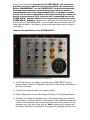
1
issues in a DC environment. We offer the stand alone ISOLATOR™ to provide
additional isolated power ports for your devices. Contact us for more info.
5) “Switched” 12v out 6A, with 2 RCA outputs.
6) “Switched” 12v out 6A, with 3 RCA outputs (Best for Dew Heaters, Focusers, etc.).
7) “Switched” Laptop Power Output (Factory set to 19.5v, user adjustable 12-35v). This
output can power any laptop, PC and MAC.
8) Laptop circuit is protected with externally accessible 6A GMA Fuse.
9) Cigarette Style 12v Out (Direct to battery) [Use with our “Cigarette Multi Port
Adapters”].
10) “Switched” Adjustable “Step Down” Outputs x2 RCA @ 3A shared (Set @ 8v for
DSLR Cameras).
11) Rugged, Stylish, Compact Aluminum Housing.
12) Rubber Feet (POWER BRICK™ Stays where you put it!).
13) Rated @ 15A Continuous Load with equivalent 100Ah Marine Deep Cycle Battery.
14) Max Current Rating 15A (Per POWER BRICK™ & Battery).
15) Chassis Approx. 2.25”H x 4.75”W x 3.75”D.
POWER BRICK™ usage:
1) Using a 14ga. “12v Battery Terminal Clip to RCA” cable (we offer this cable in
standard and custom lengths), connect the RCA side to the POWER BRICK™ “12v
In” port, and then connect the terminal ends to the respective positive and negative
terminals on your battery. At this point the digital display will light up indicating the
current voltage of your 12v battery.
2) Next, connect an 18ga. “Universal RCA to 2.1mm DC Male” cable (we offer this cable
in standard and custom lengths) to the “Laptop Out” port on the POWER BRICK™,
and the other end to a “DC Tip” that fits your laptop. Then connect that to your
laptop. Power on the “Laptop Out” switch on the POWER BRICK™ and then power
on your laptop. The POWER BRICK’s™ “Laptop Out” port is set at 19.5v at the
factory to power the most common laptop voltage varieties. However the output of
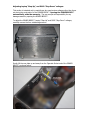
this power section is fully adjustable within the POWER BRICK™. NOTE: Opening
the POWER BRICK™ voids the warranty due to the fragile nature of the internal
components. However, I cannot stop knowledgeable users from adjusting their
POWER BRICK™ device outputs to suit their individual needs. See the “Voltage
Adjustment” section of this manual for more info.
3) I find it best to allow the laptop to fully power on before adding additional devices so
as to more accurately be able to gauge the battery’s current voltage, and the voltage
“hit” of each additional added device.