1
SVAN 953 USER MANUAL
9.1
_
Setting the language of the user interface - LANGUAGE
The LANGUAGE enables one to select the language of the user interface. In order to enter the list
one has to press the <ENTER> push-button on the inversely displayed LANGUAGE text of the SETUP
list. The selection is made by placing a special character by means of the <>, <> push-buttons
in the line with the selected language. Pressing the <SHIFT> and <> (or <SHIFT> and <>) pushbuttons results in a movement to the first position of the opened list and pressing the <SHIFT> and <>
(or <SHIFT> and <>) – results in a movement to the last position of the opened list. The selection
is confirmed and the list is closed after pressing the <ENTER> push-button. The list is closed without any
confirmation after pressing the <ESC> push-button.
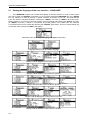
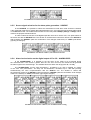
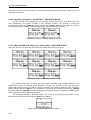
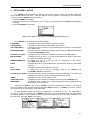
SETUP list, the LANGUAGE text highlighted (displayed inversely)
Language windows with all available languages
Displays with the English version of the user interface
Displays with the Italian version of the user interface
Displays with the Polish version of the user interface
Displays with the Hungarian version of the user interface
Displays with the Flemish version of the user interface
9-2