1
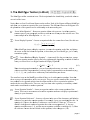
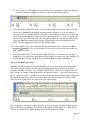
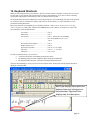
– “Insert Chapter/Section Break” – Chapter and section numbers are not required when
you’re numbering your MathType equations, but if you do use them, you’ll need to change
the chapter or section number when you move to the next chapter or section.
– “Update Equation Numbers” – This icon isn’t needed very often, because when you add an
equation prior to an existing numbered equation, the equation numbers and references that
follow the new equation are automatically updated, as I described above. When you
remove an equation though, the numbers aren’t updated. (They may update when you save
or print the document, depending on how you have your Word options set up.) Selecting
this icon will update the equation numbers immediately.
The last icon on the MathType toolbar doesn’t have anything to do with inserting equations or
equation numbers; this icon affects the entire document.
– “Export to MathPage” – This will transform the entire Word document into a nice-looking
web page. For more information on exactly what happens when you click this icon, refer to
Tutorial 14 in Chapter 4 of the MathType manual, as well as Chapter 6.
page 5