1
OVEN WASHING
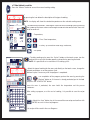
Press the “WCS” button to access the selection mask for the type of oven washing.
01/02/06
15.35
?
Pre-heat
the oven
The oven is equipped with 3 wash programs:
T
- MANUAL: Simple procedure used to clean thoroughly and quickly with minimum
in
nconvenience to the operator. - Duration 10 minutes.
PROGRAMS
With OPTIONAL Automatic Wash Kit:
W
Cooking
MANUAL
EXTRA
- SOFT: Wash procedure designed to remove daily dirt without the operator taking anyy
direct action in the cleaning operations. - Duration 24 minutes.
d
OVEN WASHING
Interactive
- HARD: Wash procedure designed to remove tough dirt without the operator taking anyy
MANUAL
direct action in the cleaning operations. - Duration 38 minutes.
d
SOFT
FAVOURITES
HARD
OVEN WASHING
MANUAL
s Select the type of wash to be carried out directly on the Touch Screen or turn the knob
onto the relevant type of wash and then confirm by pressing the knob.
PRESS START TO START
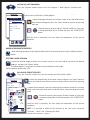
s0RESSTHE“START/STOP” button to start the manual wash procedure.
83°
OVEN WASHING
MANUAL
--
COOLING
s The display will show “COOLING” if the oven temperature is high or “WAIT” if the oven
tempeerature is low.
The oven
o
will go to the ideal temperature for washing.
01/ 03
CYCLES
OVEN WASHING
MANUAL
3°
83°
SPRAY WITH CUBE CLEAN
-52°
CYCLES
01/ 0033
OVEN WASHING
MANUAL
s If yo
ou have chosen manual washing the display will show “SPRAY WITH CUBE CLEAN”,
open the door and spray the detergent inside the oven.
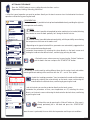
s If yo
ou have chosen the soft/hard wash the display will show “INSERT ARM”, open the
door and put the wash arm into its seat, making sure it is firmly secured. In addition,
makee sure that the tube with the detergent tank is connected.
Close the door and press the “START/STOP” button to restart washing.
--
MANUAL WASHING
01/ 03
CYCLES
CY
YCLES
WASHING ENDED58°
s Thee oven will proceed with the following cycles, the display will show the time
remaining to the end of washing.
PRESS ESC
ESC
00'
CYCLES
03/ 03
s At thhe end of the wash cycle the display will show a window stating that the procedure
is oveer. Press “ESC“ directly on the Touch Screen or confirm by pressing the knob to
remove the window.
s&ORmanual washing, rinse the oven thoroughly.
s&ORautomatic washing, remove the wash arm.
ÎääÊ-°Ên{Ì
ÊÛiÕiÊUÊ7>ÕÃ>Õ]Ê7ÊÊx{{ä£
*
i\Ênääx{{ÎäxÇÊUÊ>Ý\ÊÇ£xn{ÓΣÓx
www.piperonline.net