1
B–
B+
A–
A+
GND
N
L
B–
B+
A–
A+
N
L
GND
Fault Protection
The PDO 5580 provides protection against motor short circuits and excessive drive
temperature.
If the TEMP light is on, the PDO 5580 has detected a thermal problem and shut down
the amplifiers. The first thing you should do is to unplug the drive from the power
source. Next, touch the heat sink with your fingers. If it is very hot, the drive has
probably overheated. Usually this means you need more air flow around the drive.
If the SHORT light is on, the PDO 5580 has detected a short circuit and has shut
down the amplifiers. Unplug the drive from the power source. Check the motor
wiring carefully. Make sure that the connections to the drive are secure and that any
unused motor leads are insulated from the drive and power supply and from each
other. Check the motor leads for shorts between phases or to ground.
fuse
switch in 110V position
Installing an AC Line Cord
Remove about 5 mm (3/16 inches) of insulation from each of the three wires of your
line cord. (That’s right, three wires. For safety, always use a three wire power cord
on anything with a metal case.) Depending on where you got your power cord, it
may have black, white and green wires or brown/blue/green.
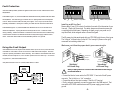
The AC power plug that was shipped with your PDO 5580 might be one of two types.
The “old style” is shown below, on the left. The “new style” (shown on the right)
comes with an insulating rubber boot.
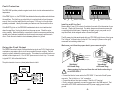
The PD5580 has a fault output to tell another device (such as a PLC) if the drive has
overheats or encounters a short circuit has occured at the motor outputs. The fault
output is optically isolated for noise immunity. This makes it more flexible and more
reliable, but also requires a 5, 12 or 24 VDC power source to hook it up. To connect
to typical PLC, follow the sketch below.
green
o
whit e r blue
o
black r brow
The photo transistor turns on (closes) when there is a fault.
"Old Style"
AC Power Plug
24 VDC
Power
Supply
!
-
COM
FAULT-
OUT
FAULT+
-20-
PDO 5580
PLC
switch in 220V position
Make sure you follow the proper sketch your connector style.
Using the Fault Output
+
fuse
To Earth Ground
To Neutral
n
To Line (Hot)
To Neutral
green
white
To Line (Hot)
black
To Earth Ground
"New Style"
AC Power Plug
Always unplug the line cord from the wall before attaching it
to the PDO 5580 O
•Connect the black or brown wire to the PDO 5580 “L” terminal of the AC power
connector. That is the line, or “hot” connection.
•Connect the white or blue wire to neutral. That’s the “N” terminal.
•Finally, and most importantly, connect the green wire to the GND terminal. That
connects the PDO 5580 metal enclosure and DC power supply ground to earth
ground.
-5-