1
Contents
Contents......................................................................................................................................................2
Introduction.................................................................................................................................................2
Creating a project........................................................................................................................................2
Data loading and geometry assignment......................................................................................................6
First arrivals picking...................................................................................................................................12
Working with the Easy Refraction module.................................................................................................15
Identifying travel time curve fragments related to different layers.......................................................17
Automatic travel time inversion............................................................................................................19
Manual travel time inversion................................................................................................................20
Exporting the results.............................................................................................................................23
Introduction
This Guide is intended for users making their first steps in refraction seismic survey (RSS) data processing
in RadExPro using the Easy Refraction module. The Guide covers all processing stages – from data
loading and geometry assignment to first arrival picking, identification of travel time curve sections
corresponding to different layers, and, finally, travel time inversion and generation of a layered velocity
model of the medium.
It is assumed that the user is already familiar with the theory behind RSS and the t0 method.
Source data as well as the project that should be generated as a result of completing this tutorial can be
downloaded from our website: http://www.radexpro.com/downloads/tutorials
Creating a project
A project is a combination of source data, intermediate and final processing results, and
processing flows organized into a common database used by RadExPro seismic data processing package.
Projects are stored in separate directories on the hard disk. When a new project is created, a project
directory is automatically created for it. Projects can be moved between computers by simply copying
the appropriate directory (provided that all used data are stored within that directory).
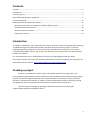
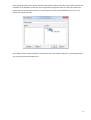
Launch the project manager by opening the Windows Start Menu and selecting All
Programs/DECO Geophysical/RadExPro 2011.2.
2