1
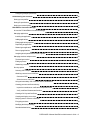
Table of Contents
Introduction
FH Web Edition features
1
New features
3
System requirements
4
FH Web Edition servers
4
FH Web Edition client
5
Installing FH Web Edition server
Manually copying the license file
6
6
Start the FH Web Edition License Manager
6
Verify that FH Web Edition Application Publishing Service and License Manager are running
6
Configuring the FH Web Edition server for Web clients
Modifying the FH Web Edition Web pages
7
8
Example: Remove platform and configuration options from existing pages
8
Example: Create a page that loads a specific application
9
Example: Create a Web page with links to specific applications
10
Installing the Web files on a system other than the FH Web Edition server
10
Configuring redundant license servers
11
Three-server redundancy
11
License-file list redundancy
12
Set or change the LM_LICENSE_FILE variable
Configuring FH Web Edition to use a central license server
Opening the license manager port in a firewall
Configuring support for client keyboards and/or IMEs
vi
1
13
14
14
15
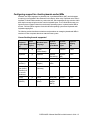
Linux client keyboards supported
15
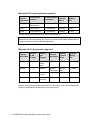
Macintosh OS X client keyboards supported
16
Windows CE client keyboards supported
16
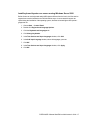
Install keyboard layouts on a server running Windows Server 2008
17
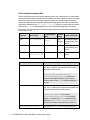
Client keyboard mapping files
18
Keyboard/IME identifiers used by FH Web Edition
20
Configuring client keyboard options
20
Specifying layout text substitutions
21
Setting fallback layout text
21
FIREHOUSE Software Web Edition Administrator's Guide