1
fuse Visualizer
Table of contents
Overview ........................................................................................................................................................ 3
What is fuse? .............................................................................................................................................. 3
Register your product ................................................................................................................................. 3
Preparing to use fuse ..................................................................................................................................... 4
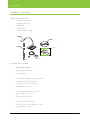
What comes in the box ............................................................................................................................... 4
Install the fuse software .............................................................................................................................. 4
System requirements ............................................................................................................................... 4
fuse installation: Windows ........................................................................................................................ 5
fuse installation: Linux .............................................................................................................................. 5
fuse installation: Macintosh ...................................................................................................................... 6
Install the fuse camera ................................................................................................................................ 6
USB cable connection ............................................................................................................................. 6
ēno option: install the magnetic icon strip ................................................................................................ 7
Using fuse Visualizer....................................................................................................................................... 8
Three ways to use fuse ............................................................................................................................... 8
Getting started............................................................................................................................................ 8
fuse application toolbar icons ..................................................................................................................... 8
Displaying the desired image ...................................................................................................................... 9
Camera LED lighting ................................................................................................................................ 9
Rotate...................................................................................................................................................... 9
Auto Focus .............................................................................................................................................. 9
Zoom in ................................................................................................................................................. 10
Zoom out ............................................................................................................................................... 10
Zoom the selection ................................................................................................................................ 10
Screen Lock .......................................................................................................................................... 10
Reset ..................................................................................................................................................... 10
Capturing images ..................................................................................................................................... 10
Capture a snapshot ............................................................................................................................... 10
Video capture ........................................................................................................................................ 11
Copy...................................................................................................................................................... 11
Print ....................................................................................................................................................... 11
Enhancing snapshots and printed images ............................................................................................. 11
fuse application settings ........................................................................................................................... 12
Getting help ........................................................................................................................................... 13
Full Screen mode...................................................................................................................................... 13
Hiding and viewing the fuse application toolbar ..................................................................................... 13
Automatic application updates ................................................................................................................. 13
Care and maintenance ................................................................................................................................. 14
Cleaning the fuse camera ......................................................................................................................... 14
Cleaning the lens ...................................................................................................................................... 14
Lighting..................................................................................................................................................... 14
FCC compliance ....................................................................................................................................... 14
Warranty ...................................................................................................................................................... 15
Index ............................................................................................................................................................ 16
2 of 16
2002327-001 Rev C
User Guide