1
On stabilizer balancing
The basic idea of stabilization is to enable the operator to keep the camera level and to move it fluidly. This is achieved
through careful counterbalancing and a low- friction pivot point (the gimbal). In practice, this means you want the section
of the FlowPod below the gimbal to be effectively ‘heavier’ than the upper section (vertical balance), and you want the
camera’s mass to be centered on the pan axis of the gimbal to keep the camera level (horizontal balance). Vertical
balance is adjusted by attaching counterweights (usually on the lower section of the FlowPod), while horizontal balance is
adjusted by positioning the X-Y plate side-to-side and front-to-back.
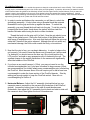
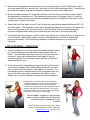
2. In order to center and balance the camcorder you will have to unlock the
gimbal/grip assembly. It locks inline using a threaded knob that extends
downward from the grip and butts up against the base. To unlock the
assembly, you must thread the knob back into the grip. To do this, start by
loosening the black ‘brake’ knob above the gimbal, and then twist the
handle clockwise while turning the knob counter-clockwise.
Thread the knob into the grip until it is flush. Now the grip should move
freely at the gimbal mount. Notice the fluid motion of the gimbal and the
wide range of available motion. Also note that the knob below the grip may
strike the C-handle if the grip is released. Although this will not cause any
mechanical damage, the knob could scratch the body, so be advised.
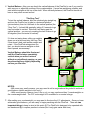
3. Now that the grip is free, you can begin balancing. In order to balance the
unit properly, you need to have the camera set up exactly as it will be used.
For example, you should remove the lens cap, flip out and position the
LCD monitor, and add on any accessories prior to balancing the unit. The
smallest change to the weight distribution on the camera can significantly
affect the balance of the FlowPod.
4. If you have a very small camera (<1.5lbs), you may not need to use the
included counterweights, but if you have a medium to large camera (>2lbs),
we recommend that you initially attach some counterweights prior to balancing
the FlowPod. Most cameras above 2 lbs will require you to add at least one
counterweight to make the lower section of the FlowPod heavier. Start by
adding just enough weight to keep the FlowPod vertical. More info on
counterweighting in Section 6.
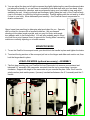
5. Horizontal Balance - Adjust the X-Y assembly (pictured below) so your
camera’s mass is centered on the pan axis (the centerline of the FlowPod
gimbal). Loosen the locking lever on the side & round thumbscrews
underneath, then adjust the X-Y assembly front-to-back and side-to-side until
the camera is level, then tighten the lever & thumbscrews.
3