1
FlowPod Operating Manual
Thank you for purchasing the versatile FlowPod, our patented
stabilizer/support. The FlowPod offers several shooting options that
will help to improve and distinguish your productions. The FlowPod
(VZ-FP) comes supplied with the following: 3 counterweights, hex key
(3/16”), balancing plate (VZ-FPB), and quick-release camera plate.
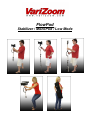
The FlowPod can be used in at least three distinct operating modes:
stabilizer, monopod, and low-flow (for low-level shots). Since the
FlowPod was designed with versatility in mind, you may discover other
creative ways to use it, but first read these WARNINGS:
- We do not suggest running at full speed with the FlowPod, as you could trip or
collide with something, possibly resulting in injury or damage to your gear.
- Do not use it in stabilizer mode with the monopod section extended.
- Exercise caution when operating in low-flow mode to ensure that you do not
strike the ground, other objects, or trip yourself.
- Do not overload the FlowPod or lean on it like a walking cane.
- Do not over-tighten the grip/gimbal assembly or damage may result
It may take a little while to learn how to use the FlowPod
properly, so please read the instructions thoroughly before
attempting to use it. As packed, the unit is configured for basic
stabilizer mode, and you will have to complete a few steps
before you will be ready to shoot.
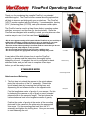
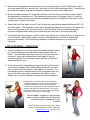
X-Y Plate
Gimbal / Grip
STABILIZER MODE
Counterweight shaft
Attachment and Balancing
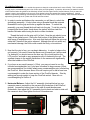
1. The first step is to attach the camera to the quick release
plate (the top section of the X-Y assembly). Detach the
quick release plate by loosening the locking lever and
depressing the red release button on the opposite side.
Find the lengthwise center of gravity of your camera. Do this
by balancing the camera on top of a pen or pencil oriented
perpendicular to the camera’s length. The spot where the
camera balances best is the lengthwise center of gravity.
Position the center of gravity at the center of the mounting
plate and fix the camera to the plate using the appropriate
size screw. Put the mounting plate back onto the X-Y
assembly and tighten the locking lever. Now you are ready
to start balancing the unit.
2
Monopod