1
Getting Started
Chapters
1–3
This table provides an overall description of the topics covered within this manual.
Getting Started
2
Installation and
Specifications
3
Configuring Your Panel
4
Applying Ladder Logic
Shows how to prepare for system installation, including specifications and
mounting instructions. Includes connecting cables part numbers and
specifications.
shows how to configure the panel. The OP–WINEDIT for windows
contains Help windows which will assist with configuring the panel.
Explain the memory map and how to program and operate the panel.
Getting Started
1
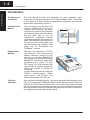
Introduces the physical and functional characteristics. Also provides
introduction to planning your system.