1
1–2
Getting Started
Getting Started
Introduction
The Purpose of
this Manual
This User Manual provides user information on panel installation, panel
configuration, and programming the OP1312 Setpoint/Display Panel. The purpose
of this manual is to teach concept and programming techniques which may be
applied while implementing the panel.
Contents of the
Manual
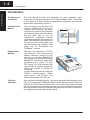
Inside this manual you will learn about
using the OptiMate OP–1312 panel. It
includes wiring diagrams and power
requirements, as well as the information
you need for selecting the proper cables.
We will show how to use the
OPWIN–EDIT configuration software
(purchased separately) to configure your
panel. And in the back of this manual, we
will show you some simple ladder logic
that demonstrates the versatility of the
panel, both for Allen-Bradley and
PLCDirectt products.
How to
Use the
OP-1312
OP-1312
The OPĆ1500 and OPĆ1510
Operator panels may be
reconfigured to exchange data
with
your
programmable
controller.
Supplemental
Manuals
Reference the appropriate PLC/CPU
User Manuals for the commands and
address references required for your
system. If you are using a DirectLOGIC
PLC product, you will want to keep the
DirectSOFT User Manual handy while
programming your system. For other
PLC brands you must reference their
User manuals to properly program the
ladder logic required to operate the
OP-panels.
For Multi-Panel applications utilizing the
OPĆ9001
Communications
Master
please refer to the OP–9001 User
Manual (Part Number OP–9001–M).
Technical
Assistance
After completely reading this manual, if you are not successful with implementing the
OP–1312, you may call PLCDirect at (800) 633-0405, Monday through Friday from
9:00 A.M. to 6:00 P.M. Eastern Standard Time. Our technical support group will work
with you in answering your application questions. If you have a comment or question
about our products, services, or manuals which we provide, please fill out and return
the suggestions card included with this manual.