1
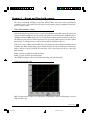
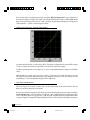
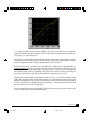
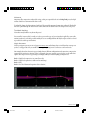
So, very high-level audio peaks between 0 and –10dBFS are not touched at all, audio between –10 and –40 is
compressed, and audio below –40 is not compressed, but is clearly louder at the output than at the input.This is lowlevel compression, or “upward compression”.
Such a trick is very useful and has been implemented by classical recording engineers, mastering houses, and classical broadcasting. Low-level compression can “lift” soft sounds up gently and leave all the high-level peaks and
transients completely untouched, reducing the dynamic range from the bottom upwards.
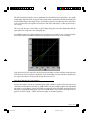
We did say that the C4 was “very similar” to the C1, but different in a significant way: the Threshold defines the
midpoint of the Range. Therefore, to achieve the same curve in the C4 as shown here, the Threshold on the C4
would actually be about –25 with a Range setting of +15.5dB. Now this is a very large amount! The example shown
here was merely to make it obvious; we picked the 2:1 line only because it is easier to see on the page. In reality, lowlevel compression that lifts the softer audio up 5dB is equivalent to a approximate ratio of 1.24:1.
Lifting the low-level up about 5dB is a good example for several reasons. It is (1) a very realistic setting that could be
equal to what is being done by the previously mentioned engineers; (2) only raising the noise floor by an acceptable
amount for many applications; (3) easy to hear on nearly any type of audio, not only classical. In the Load menu of
the C4 are a few factory presets with names beginning “Upward Comp…” that are good points to learn more about
this concept. More presets are in the C4 Setup Library.
In the next chapter there are more specific examples of using low-level processing (compression, expansion) that
are very good starting points as well as models for learning.
C4 Plug-In Manual
C4 Version 3
21
8/31/00, 11:40 AM
21