1
Ecaccess
Gateway, Tools and ectrans
Dominique Lucas
User Support
advisory@ecmwf.intSlide 1
COM INTRO 2014: ECaccess
1
Content
ECaccess concepts
Ecaccess tools
Ectrans
Tutorial
Slide 2
COM INTRO 2014: ECaccess
2
ECaccess - Concepts
ECaccess provides a portal to access ECMWF
archiving and computing facilities.
Strict authentication via ActivIdentity tokens and X509
certificates.
Data integrity/confidentiality guaranteed by SSL
Slide 3
COM INTRO 2014: ECaccess
3
ECaccess - Concepts
ECaccess provides:
- File and job management in batch or interactive mode
through an extended FTP/SFTP server
- File and job management through a Web browser
- A secure ssh access to ECMWF
- A secure X11 access to ECMWF
- Various services via the web.
All this via Internet or RMDCN.
Slide 4
COM INTRO 2014: ECaccess
4
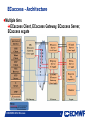
ECaccess - Architecture
Multiple tiers
ECaccess Client, ECaccess Gateway, ECaccess Server,
ECaccess ecgate
Slide 5
COM INTRO 2014: ECaccess
5
ECaccess - Architecture
ECaccess client
-
Standard FTP, SFTP, SSH, HTTP/S or NX clients
-
Standard X Server (not needed for NX) and FTP Server
-
ECaccess tools - new (4.0.0) and old versions (3.3.0)
ECaccess gateway
-
Entry point for all ECaccess users
-
Verifies ECaccess users authentication
(certificates or passcodes)
-
Implements FTP/SFTP and HTTP/S protocols
-
Secure tunnels through firewalls to ECaccess Server
-
Either local ECaccess gateway installed at your site OR
-
Gateways located at ECMWF: ecaccess.ecmwf.int for
Internet and msaccess.ecmwf.int for RMDCN
COM INTRO 2014: ECaccess
Slide 6
6
ECaccess – Architecture
ECaccess Server
- Located at ECMWF: ecaccess.ecmwf.int or msaccess.ecmwf.int
- Entry point for all ECaccess gateways
- Keeps track of users activity
ECaccess ecgate
- Runs the ECaccess Certificate Authority (CA)
- Provides job management through LoadLeveler (c2a), SLURM
(ecgate) or PBS (cca)
- Provides access to home, scratch, ECFS and host filesystems
- Keeps job input, output and error files
- Manages spool for unattended file transfers Slide 7
COM INTRO 2014: ECaccess
7
ECaccess – local (MS) gateways
Use local ECaccess gateways if installed
Internet ECaccess gateways available at most NMSs and
at several other sites (44 gateways in total)
11 ECaccess Gateways available over RMDCN
If local ECaccess gateway is not available, then use
ECMWF gateways ecaccess.ecmwf.int (Internet) or
msaccess.ecmwf.int (RMDCN)
Slide 8
COM INTRO 2014: ECaccess
8
ECtools - ECaccess tools
•
•
•
These tools must be installed at your end on each platform for
which access to ECMWF services are required.
Two versions available at the moment
•
•
•
Version 4.0.0 has been available for 2 year
Version 3.3.0 will disappear
Version 4.0.0 of the tools requires version 4.0.0 of gateway
to be installed
•
•
Check with your administrator
You can use ECMWF gateways in the meantime
ECtools are also available on ECMWF computers.
Slide 9
COM INTRO 2014: ECaccess
9
ECtools - eccert Command
{mshost}$ ecaccess-certificate-create
Please enter your user-id: tr?
Your passcode: *****
{mshost}$ ecaccess-certificate-list
submitJob
168h
Mar 11 11:25
getJobList
168h
Mar 11 11:25
deleteJob
168h
Mar 11 11:25
…
job submission
job list
delete a job
Certificate valid for 7 days, but this can be extended for special
requirements.
Certificate only needed for file, job and transfer management,
NOT required for unattended transfers (see
later - ectrans).
Slide 10
Certificate not needed for ECMWF local use of ECtools.
COM INTRO 2014: ECaccess
10
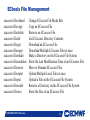
ECtools File Management
ecaccess-file-chmod
ecaccess-file-copy
ecaccess-file-delete
ecaccess-file-dir
ecaccess-file-get
ecaccess-file-mget
ecaccess-file-mkdir
ecaccess-file-modtime
ecaccess-file-move
ecaccess-file-mput
ecaccess-file-put
ecaccess-file-rmdir
ecaccess-file-size
Change ECaccess File Mode Bits
Copy an ECaccess File
Remove an ECaccess File
List ECaccess Directory Contents
Download an ECaccess File
Download Multiple ECaccess Files at once
Make a Directory on the ECaccess File System
Show the Last Modification Time of an ECaccess File
Move or Rename ECaccess Files
Upload Multiple Local Files at once
Upload a File on the ECaccess File System
Remove a Directory on the ECaccess File System
Show the Size of an ECaccess File
Slide 11
COM INTRO 2014: ECaccess
11
ECtools Job Management
With ECtools you can submit shell scripts and LoadLeveler
command files to the LoadLeveler queues of ecgate and the
supercomputer.
ecaccess-job-delete
ecaccess-job-get
ecaccess-job-list
ecaccess-job-restart
ecaccess-job-submit
ecaccess-queue-list
Delete an ECaccess Job
Download a Job Output/Input/Error File
List all ECaccess Jobs
Restart an ECaccess Job
Submit a new ECaccess Job
List available queues
If you submit a shell script you will have to use the option
“–noDirectives” which will add default LoadLeveler directives
Slide 12
COM INTRO 2014: ECaccess
12
Data transfers from ECMWF - ectrans
Unattended file transfers
Automatic retrial on failure
Synchronous or asynchronous
Downloads or uploads
Secured transfers using ftp or sftp
Ectrans associations can be set up for various destinations
Association name is unique on each gateway
Association has to be created on the particular gateway in use
Email notification
Transfers are always initiated from ECMWF
Slide 13
COM INTRO 2014: ECaccess
13
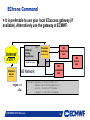
ECtrans Command
It is preferable to use your local ECaccess gateway (if
available). Alternatively use the gateway at ECMWF.
MS Server
running
the gateway
Internet
RMDCN
ECaccess
Server
Shared File System
MS Network
file://
MS
Workstation
ms1
ECaccess
Gateway
(Member State)
ftp://
MS
Workstation
ms3
(ECMWF)
ecgate or
c2a:
$ ectrans –gateway ecaccess.ecmwf.int \
-remote association[@protocol] \
–source [location/]filename \
[-target [location/]filename]
Slide 14
COM INTRO 2014: ECaccess
14
MS
Server
ms2
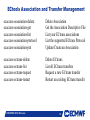
ECtools Association and Transfer Management
ecaccess-association-delete
ecaccess-association-get
ecaccess-association-list
ecaccess-association-protocol
ecaccess-association-put
Delete Association
Get the Association Descriptive File
List your ECtrans associations
List the supported ECtrans Protocol
Update/Create an Association
ecaccess-ectrans-delete
ecaccess-ectrans-list
ecaccess-ectrans-request
ecaccess-ectrans-restart
Delete ECtrans
List all ECtrans transfers
Request a new ECtrans transfer
Restart an existing ECtrans transfer
Slide 15
COM INTRO 2014: ECaccess
15
ECtrans – Association Maintenance
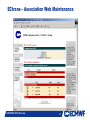
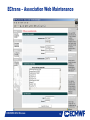
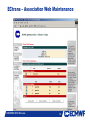
ECtrans associations can be generated with
New ECtools: ecaccess-association-put
ECaccess gateway web interface
Creation and use of an association template using new
ECtools:
{mshost}$ ecaccess-association-get -template assoc
assoc.txt
{mshost}$ $EDITOR assoc.txt
# EDIT your template
Slide 16
{mshost}$ ecaccess-association-put –password
assoc.txt
COM INTRO 2014: ECaccess
16
ECtrans – Association Web Maintenance
Slide 17
COM INTRO 2014: ECaccess
17
ECtrans – Association Web Maintenance
Slide 18
COM INTRO 2014: ECaccess
18
ECtrans – Association Web Maintenance
Slide 19
COM INTRO 2014: ECaccess
19
ECtrans – Association Web Maintenance
Slide 20
COM INTRO 2014: ECaccess
20
ECtrans – Association Web Maintenance
21
MS associations are specific to each Slide
ECaccess
gateway!!!
COM INTRO 2014: ECaccess
21
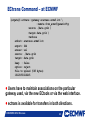
ECtrans Command – at ECMWF
{echost}$ ectrans -help
usage: ectrans [-gateway name] -remote association[@protocol] \
[-get|-put] -source [ec:|ectmp:]filename [args ...]
-gateway {arg} - access gateway name (default (**):
ecaccess.ecmwf.int)
-remote
{arg} – association and optional transfer protocol
(default (**): *none*)
-source
{arg} - source file name
-target
{arg} - target file name (default: same as -source)
-mailto
{arg} - target email address (default: current user)
-put
- interactive/synchronous transfer (no spool)
-get
- interactive/synchronous pull (rather than
push) file
-onsuccess
- mail sent on successful transfer
-onfailure
- mail sent when transfer has failed
Slide 22
-onretry
- mail sent when transfer
is retried
-verbose
- verbose mode on
COM INTRO 2014: ECaccess
22
ECtrans Command – at ECMWF
{ecgate}$ ectrans –gateway ecaccess.ecmwf.int \
-remote from_ecmwf@genericFtp
–source ./data.grib \
–target data.grib \
-verbose
echost: ecaccess.ecmwf.int
ecport: 644
ecuser: usl
source: ./data.grib
target: data.grib
keep : false
option: reject
File to upload (585 bytes)
10129250216245
Users have to maintain associations on the particular
gateway used, via the new ECtools or Slide
via23the web interface.
ectrans is available for transfers in both directions.
COM INTRO 2014: ECaccess
23
ECtools Transfer Management
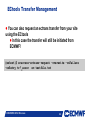
You can also request an ectrans transfer from your site
using the ECtools
In this case the transfer will still be initiated from
ECMWF!
{mshost}$ ecaccess-ectrans-request -overwrite -onFailure
-onRetry tr?_assoc ec:testfile.txt
Slide 24
COM INTRO 2014: ECaccess
24
ECtools Transfer Management
{mshost/echost}$ ecaccess-ectrans-list
389
STOP
tr00_test teaccess.ecmwf.int
387
DONE
tr00_test teaccess.ecmwf.int
{mshost/echost}$ ecaccess-ectrans-list 389
Copyid: 389
MS user: tr00_test
Hostname: teaccess.ecmwf.int
Status: STOP
Last error: Target file already exist
Schedule: Mar 09 18:29
Source: /wshome/ectrain/tr00/testfile
Target: testfile
File size: 11
Slide 25
Target file does already exist!
COM INTRO 2014: ECaccess
25
Mar 09 18:29
Mar 09 14:39
ECtools Transfer Management
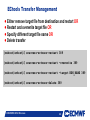
Either remove target file from destination and restart OR
Restart and overwrite target file OR
Specify different target file name OR
Delete transfer
{mshost/echost}$ ecaccess-ectrans-restart 389
{mshost/echost}$ ecaccess-ectrans-restart –overwrite 389
{mshost/echost}$ ecaccess-ectrans-restart –target NEW_NAME 389
{mshost/echost}$ ecaccess-ectrans-delete 389
Slide 26
COM INTRO 2014: ECaccess
26
ECaccess Pointers
http://www.ecmwf.int/services/ecaccess
- User’s manual
- Administrator’s manual
- Registration centre (for local ECaccess gateways)
Slide 27
COM INTRO 2014: ECaccess
27