1
that we did in the code above, is demonstrate how rPlant may be used
to break up some files that had naming conventions that were separated
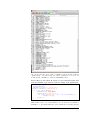
by underscores. If you look back to the earlier image that showed what
our known-truth data sets looked like, you would see that phenotype,
heritability information, and population structure are all in the naming
format for each data set.
This is an important piece of information, because without an appropriate
naming structure, there would be no way for us to keep metadata on the
known-truth data sets throughout this testing process.
We break up the names to grab the pieces about phenotype information
in order to essentially stratify-sample our data sets by genotype. We then
have six data sets for any one genotype (three missing values types and
two population structure types), and then we just pick two at random.
This insures that we include all of our genotypes in our runs, but there are
simpler ways to do this, that basically just random sample from all of our
data sets. The following code again assumes you are using PEDMAPs to
run PLINK, but that you just want to sample a random 300 (as opposed
to a stratified-random sample).
>
>
>
>
>
>
>
>
+
+
+
+
+
3
3.1
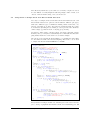
set . seed ()
require ( rPlant )
V a l i d a t e ( ” username ” , ” password ” )
mydir <− L i s t D i r ( ” s i m u l a t i o n s ” )
mydir <− mydir [ , 1 ]
oddsamp <− s e q ( 1 , 5 9 9 , 2 )
t o t e s t <− sample ( oddsamp , 3 0 0 , FALSE)
for ( i in 1: length ( totest )) {
SubmitJob ( j o b . name=NULL,
a p p l i c a t i o n=” p l i n k −1.07 u l ” , f i l e . l i s t =
l i s t ( mydir [ t o t e s t [ i ] ] , mydir [ t o t e s t [ i ] + 1 ] ,
f i l e . path=” s i m u l a t i o n ”
}
Aggregating with Aggregate
How to Use the GUI Aggregate Tool
The second major step is accomplished once all the runs have finished. In
our example, depending on the resources available, PLINK can finish in
a range from ten seconds to two and half minutes per run (not including
the queuing process). This is non-linear as well, because many will be
running simultaneously on separate nodes while some remain in queues.
Its hard to gauge exactly how long your tool will take, but it will almost
definitely run faster on multiple nodes this way.
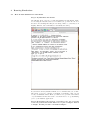
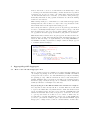
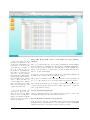
Step 2-A) Log in to the DE and make sure all runs are complete.
Let’s say that we have already run all of our runs. Then we would want
to log in to the iPlant Discovery Environment to make sure all the folders
are in our analyses folder. As can be seen, each run of PLINK with each
distinct known-truth data set has been put in to each folder. If we were
to open up each folder, we would see a set of files, of which only one
we will want to put through Validate. In the case of this PLINK run,
you need to put each file ending in .qassoc (the standard PLINK output
filetype) in to a single folder, so that we can run Validate on that folder.
10
Validate: A Workflow for Evaluating GWAS/QTL Tools