1
BASIC Answers to BASIC Questions
OUTPUT TO A PRINTER
(Section 8.6)
(Section 8.6 in the User's Manual contains information referenced
here.) Channel 0 has special meaning for the PRINT statement. Using
channel 0 without using an OPEN statement when PRINTing is just like
PRINTing to the terminal.
200 PRINT #0, "THIS IS A TEST"
will print THIS IS A TEST on the terminal, exactly as if the "#0," were not
present.
Opening channel 0 allows you to send output to some other device such
as a printer instead of the terminal.
Using OPEN on channel 0 tells
BASIC to read the file name specified as a file containing a printer
driver routine such as PRINT.SYS in FLEX and use this new output routine
whenever PRINT #0 is specified. For example,
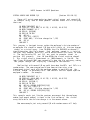
10
20
30
40
50
60
OPEN "0.PRINT" AS 0
PRINT #0,"TABLE OF SQUARES AND SQUARE ROOTS"
FOR I=1 TO 100
PRINT #0,I,I*I,SQR(I)
NEXT I
CLOSE 0
Line 10 tells BASIC to use file 0.PRINT.SYS (SYS is the default
extension when channel 0 is referenced) as the output routine on channel 0.
Notice the OPEN OLD was not necessary. On line 20 we print a header line
which is output through the printer routines found in the PRINT.SYS file.
Line 40 will now print on the printer the values of the number (I), the
square and the square root of the number (I). The CLOSE 0 statement will
now make all following PRINT #0 statements act just as in the example at
the beginning; all output will be displayed on the terminal until another
OPEN AS 0 statement is executed.
It is very important that the file
specified in the OPEN AS 0 statement is actually a printer system file such
as PRINT.SYS.
If it is not, unpredictable results will occur, possibly
crashing BASIC!
-2-