1
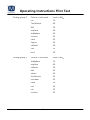
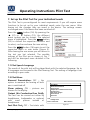
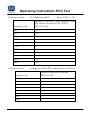
Operating Instructions Pilot Test 7. Set up the Pilot Test for your individual needs The Pilot Test is pre-configured for most requirements. If you still require some functions to be set up for your individual needs, enter the user menu. After having set the changes they are saved in the device. The settings remain unchanged even if the device has been switched off. Press the MENU button (16). By pressing the ▲ (21) or ▼ button (19), the different menu options can be chosen. The selected menu is highlighted. Press the ENTER button (22) to choose the respective submenu and to select, confirm and save the new setting. Press the MENU button (16) again to exit the respective menu or user menu (Figure 3). After leaving the user menu you will return to the test you last selected. The possible settings of the Pilot are as shown in Fig. 7 and will be descriped more detailed in the following. Figure 7 7.1 Pilot Speech Language The words of the pilot test will be played back with the selected language. Up to 6 languages can be saved in the Pilot Hearing Test. The setting of language is set according to your order. 7.2 Pilot Menu Binaural Presentation: OFF – the option to measure the hearing of both ears is switched off. Show picture: ON – pictures are shown on the display. Output (Air Conduction/Free Field): The test can be carried out either by headphones, loudspeaker or optional with insert phones instead of headphones. Fast Pilot Test: OFF – Test starts with GEBA_Pilot_e_13b.doc 19 Pilot Menu Binaural Presentation Show Picture Output (Air Conduction/free Field) Fast Pilot test Pilot Pause Length Show Results Print Size Change Item Enter: Select Item Menu: Return Figure 8 851 854/5 03/13