1
English
Learning more about the camera (“Help Guide”)
“Help Guide” is an on-line manual. Refer to it for in-depth
instructions on the many functions of the camera.
1 Access the Sony support page.
http://www.sony.net/SonyInfo/Support/
2 Select your country or region.
3 Search for the model name of your camera within the
support page.
• Check the model name on the bottom of your camera.
Viewing the Guide
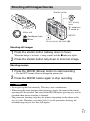
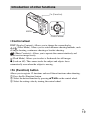
This camera is equipped with a built-in instruction guide.
Fn (Function)
MENU
(In-Camera Guide)
In-Camera Guide
The camera displays explanations for MENU/Fn (Function) items and the
setting values.
1 Press the MENU button or the Fn (Function) button.
2 Select the desired item, then press the
(In-Camera Guide) button.
Shooting Tip
The camera displays shooting tips for the shooting mode selected.
1 Press the
(In-Camera Guide) button in shooting mode.
2 Select the desired shooting tip, then press z on the control wheel.
The shooting tip is displayed.
• You can scroll the screen using v/V and change shooting tips using b/B.
GB
2