1
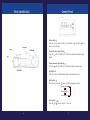
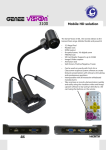
Parts Identification
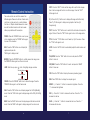
Control Panel
Power button
Press the button once to power on the visualiser; press the button again to
power off the visualiser
Output visualiser signal button
Press the button, the RGB OUTPUT terminal outputs the visualiser signal
Output
Output computer signal button
Press the button, the RGB OUTPUT terminal outputs computer signal
Auto button A
Press the A button to automatically adjust white balance and focus
Light button
Each time you press the
button, the lighting changes as below:
The body lights on
The back light on
All the lights off
Zoom button
Press the or
4
button to zoom in or zoom out
5