1
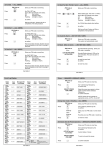
Time Change — (MANAGER USER ONLY)
The time can be changed by a Manager User only. To change time, proceed as
follows
Press
6
Press
3
Enter manager PIN code or smart key.
LED
STATUS
Mains
(GREEN)
then
✓
the current time will be displayed with the
first digit flashing. Enter the new time
directly to move to the next field.
✓
to confirm.
The clock on the control panel can be adjusted to add or remove a programmed
number of seconds each day. The adjustment is allowed to cater for a slow or
fast clock. To adjust the clock it must be known how much adjustment is
required ie the number of seconds the clock loses or gains per day. The
adjustment is automatic at midnight each night and does not have to be carried
out each day.
6
3
✓
Press
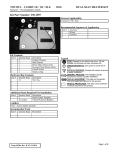
Mains Present
Power Failed
Running off battery
ON
OFF
FLASH
System may be optioned to show
the day LED status when no
users are logged on.
Panel ready to set
The panel is not ready to set.
Setting started
ON
FLASH
OFF
Will be on if the panel is reset when
a PA, Fire, 24 hr or tamper circuit is
still open. Will also be on if a fault is
present when setting.
Programmer logged on.
Zone clear no setting problems
Tamper
(RED)
ON
System in tamper alarm condition
Zones
(RED)
ON
Shows the zones which are
selected for setting. Also shows
zones which have alarmed in alarm
log.
Indicates the zones which are not in
the setting group or zones which are
omitted.
To adjust the clock proceed as follows:
Press
ON
OFF
FLASH
Day
(GREEN)
Fault
(AMBER)
then
the current time will be displayed with
the first digit flashing.
Clk adjust = + 0
Enter adjustment in seconds.
Press
Press
To change from adding time to removing
time.
✓
FUNCTION
OFF
to confirm adjustment.
NOTE: It is essential that the time adjust is only used if the amount of
adjustment is known. The adjustment should only need to be carried out
once.
Guardall Limited
Lochend Industrial Estate
Newbridge
Edinburgh EH28 8PL
Part No. 320519-OD
User Guide 16
User Guide 14
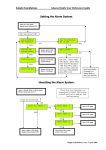
Managed Reset Operation (LCD ONLY)
Managed reset is only required if the panel has been configured for engineer
reset and managed reset is turned on. Following an alarm, the panel can be
unset by entering a valid PIN code or smartkey. This will silence the sounders.
To reset the Tx channels follow reset after an alarm procedure. Once unset,
the panel cannot be set until a managed reset code is provided. If an attempt to
Full Set or Part Set 1 or 2 is attempted, the LCD keypad will display a 5 digit
number. Your alarm company should be contacted with this number and they
will issue a reset PIN code. Entering this PIN code will reset the panel and allow
the system to be set again. The Reset PIN code can only be entered when RST
number is displayed e.g.
PIN Code or
Enter your PIN code or smart key.
MAN RESET RQD
Press
RST CODE = ?????
Press
******
will be displayed on LCD keypad
to set system. A 5 digit number will be
displayed. Contact the alarm company for
PIN code and enter the 6 digit number
If sucessful the Fault LED will extinguish
and the panel can now be set.
THE PANEL CAN BE RESET AT ANY TIME BY
ENTERING A VALID ENGINEERING CODE.
User
Guide
IMPORTANT NOTE:
User Guide 15
THE CONTROL PANEL CAN BE PROGRAMMED TO ALLOW LOG ON BY
ENTERING A VALID PINCODE OR ENTRY OF A VALID PINCODE
FOLLOWED BY ✓
CONFIRM. PLEASE CONSULT YOUR INSTALLER
TO VERIFY WHICH METHOD OF LOG ON THE CONTROL PANEL HAS
BEEN PROGRAMMED TO ACCEPT.
© Guardall Limited 1996
PIN Code or
LED FUNCTIONS