1
User Authority setting/unsetting options(MANAGER USER)
Text (MANAGER USER ONLY)
The user authority is only available to a Manager user. User 01 is defaulted as a
manager and this cannot be changed. To assign authority proceed as follows :
Text can be customised using an LCD keypad. Text can only be customised
by a Manager User.
PIN Code or
XXXX or
Press
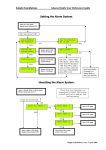
Enter Manager PIN code or smart
key.
then
this selects the authority programming
(Mains/Tamper LEDs on)
select the user number whose authority is
to be set
(mains, Tamper & Day LEDs on once User
is selected)
6
✓
Press
0
2
to
1
Press
Press
4
0
1
1 = Manager or
2
2 = Ordinary or
3
3 = Set only or
4
4 = Duress or
✓
to confirm selection
Will be displayed if no setting/unsetting
authority has been assigned.
Press
0
0 = Standard authority
1
1 = P1 authority
2
2 = P2 authority
3
3 = Full authority
✓
to confirm selection
then
to select group text or
7
✓
Press
then
to select user text
8
✓
9
Press
then
to select zone text
✓
0 = OFF or
AREA = OFF
Press
Press
Enter manager PIN code or smart key.
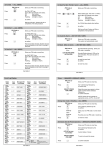
Once group, user or zone text is entered, the following keys allow the selection
of certain characters or functions.
1
2
3
4
5
6
7
8
9
0
-
Select A
Select M
Select Z
Select a
Select m
Select z
Select 1
Select 9
Select .
Deletes text to the right of the
flashing character
Moves up the alphabet
Moves down the alphabet
Selects/confirms choice of character
Confirms whole text string
Reverts to previously selected text
√ X Default Text
Zone No
1
2
3
to
32
Text
User No
zone 1
zone 2
zone 3
zone 32
1
2
3
to
14
Text
User 1
User 2
User 3
Group
1
2
3
4
Text
Part 1 set
Part 2 set
Full set
System unset
User 14
The LCD Keypad can also be used for displaying the default or customised text when required.
When chime, omit, walk test or alarm log are being displayed, pressing key 9 will display zone
text and when set indications are selected then group text is displayed.
User Guide 6
UserAuthority setting/unsetting options (MANAGER USER)
The setting/unsetting authority is only programmable by a Manager user.
Setting/unsetting authority can be assigned to each user. After selection of
authority level for the user (see above) the user can be assigned ,P1, P2 or Full.
Full authority will also allow setting/unsetting of P1 or P2. To assign setting/
unsetting authority proceed from setting the user authority and assign setting/
unsetting authority.Once setting/unsetting authority has been assigned the user
will only be able to set/unset the parts they have been authorised to set/unset. If
a user with authority for P1 tries to set/unset P2 or Full then an error tone will be
emitted from the keypad.It is critical to the correct operation of the system
that each user is fully aware of the authority they have and the setting/
unsetting authority they have been assigned.It should be noted that the user
must also know which keypads have authority over which parts of the system
as this has a major impact on what can be achieved on the system.
Note : The action of selecting OFF for a User authority will change the PIN
code to factory default.
If Duress User authority is selected, when logging on to change the PIN,
a duress alarm will be created.
User Guide 8
Walk Test — (MANAGER USER)
PIN Code or
Press
Press
0101 (MANAGER FIXED)
0202 (NO AUTHORITY)
0303 (NO AUTHORITY)
|
|
1414 (NO AUTHORITY)
User Guide 7
✓
to confirm.
X
the cancel key to exit.
Sounder Test — (MANAGER USER)
PIN Code or
Press
5
✓
Enter manager PIN code or smart key.
the 5 (Sndrs) key followed by
to confirm.
Speaker will operate for 60 seconds or
Press
DEFAULT PIN CODE
DEFAULT PIN CODE
DEFAULT PIN CODE
|
DEFAULT PIN CODE
the 4 (Walk) key followed by
Display will scroll through untested zones.
If OFF is selected for setting/unsetting authority then the system will
unset everything that is set when the Pin code is entered rather than
controlling individual parts that are assigned to the user through setting/
unsetting authority.
USER 01
USER 02
USER 03
|
USER 14
4
Detector test is now enabled.
Manager SET / UNSET / OMIT / CHIME / CHANGE PIN / TEST /
CHANGE TIME / EDIT TEXT / VIEW LOG / REMOTE ACCESS
Ordinary SET / UNSET / OMIT / CHIME / CHANGE PIN
Set Only SET / CHANGE PIN
Duress AS ORDINARY BUT GENERATES PA TX OUTPUT
IN DEFAULT ONLY USER 01 HAS AUTHORITY. THE AUTHORITY FOR
USER 01 IS SET FOR MANAGER AND THIS AUTHORITY CANNOT BE
CHANGED.AS EACH USER IS REQUIRED THEN THE AUTHORITY
SHOULD BE ASSIGNED, AFTER THIS IS COMPLETE THE PIN CODE
SHOULD BE CHANGED FROM DEFAULT.
Enter manager PIN code or smart key.
✓
✓
X
to move on to sounder which will operate
for 60 seconds or
to move on to strobe which will operate
for 60 seconds or
the cancel key to exit.
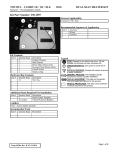
Exit Faults
If a zone alarms during the exit time, the setting tone will change and the
fault LED will be on. If the zone does not clear by the end of the exit time, the
system will not set and the faulty zone will be indicated on the zone LED's when
the User logs on.
User Guide 9