1
Smart Field Lysimeter
These parameters are entered using the web interface (see chapter 5.4 Change configuration).
Everything is ready to operate when you use the provided UMS SIM card. As a default the data are stored on the UMS web server umsdataview.de. In the web interface of the logger you can change the FTP server and the access data. Preferably
you use the economical .DBD format although you need to merge the data later on.
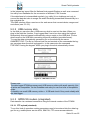
Figure 18: example of daily transmitted .DBD data on the FTP server
5.2.3.2 umsdataview.de server
The data transfer to the server umsdataview.de runs automatically when you use the
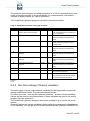
UMS SIM card. The server runs a service that provides your data as readable Excel
files sorted by months (see Figure 19).
With every upload of the logger the file will be created new. This is usually done once
a day.
Please note
The SIM card and the service are included in the Lysimeter basis set for the first
year. To extend the use please contact UMS.
If you do not need this service, please send back the UMS SIM card. Thank you!
Seite 19 von 65