1
HandyTech
ElektronikGmbH
turned on, the Easy Braille will automatically be recognized by USB-enabled operating
systems. The power for the Easy Braille is supplied via the USB interface. You can turn on
the Easy Braille with its power switch as soon as the USB cable is connected and the PC
is turned on.
If you want to connect the Easy Braille via the wireless Bluetooth interface, please read
section 2.5 “Installing the Bluetooth Connection” in the user manual.
Operation as a Braille Display
Please make sure that your Easy Braille is properly connected and switched on before
starting up the screen reader program, because otherwise the screen reader will not be
able to detect it. As a rule, the screen reader will display the currently selected position
within the active window on the Braille display. For example, if you are moving through a
menu, the selected menu item is displayed. The two long navigation keys [L] and [R] allow
you to move through text. The various screen reader program functions are assigned to
specific keys on your Easy Braille.
Braille Input with the Easy Braille Function Keys (SPC+1 2 7) (Chord B)
In order to utilize this function, you will need the current driver of your screen reader for
Handy Tech's Braille displays. We recommend installing the driver that was delivered
along with your Easy Braille.
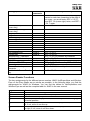
Table of Key Commands for Controlling the PC
PC key(s)
Activate/deactivate PC
control
Backspace
Delete
Paste
Alt for next character
Activate/deactivate Alt
Enter
Ctrl for next character
Activate/deactivate Ctrl
Tab
Shift + Tab
Ctrl + Tab
Ctrl + Shift + Tab
Escape
Shift + Escape
Shift + character
Shift Lock on/off
Cursor keys
Mark
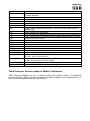
Chord
commands
Chord B
Emulated on the Easy Braille by
Chord b
SPC + 1 2 or 7
SPC + 4 5
SPC + 2 4
SPC + 7 8
L+R+78
8
SPC + 3 6
L+R+36
SPC + 2 3 4 5
SPC + 2 3 4 5 7
SPC + 3 6, SPC + 2 3 4 5
SPC + 3 6, SPC + 2 3 4 5 7
SPC + 1 5
SPC + 1 5 7
SPC + 2 3 4, character
SPC + 2 3 4 7
Up: SPC + 1, Left: SPC + 7,
Down: SPC + 4, Right: SPC + 8
SPC + 2 3 4 7 "holds down" the shift key until
SPC + 2 3 4 7 is pressed again. It is
therefore possible to work with all cursor
Chord i
Chord t
Chord T
Chord e
Chord E
Chord s
Chord S
Chord S
SPC + 1 2 7