1
FV8010 User Manual
# update ftp –user xxx –password xxx –ip x.x.x.x –file xxx
# update tftp –ip x.x.x.x –file xxx
Example:
# update ftp –user abc –password 123 –ip 202.112.20.15 –file FV8010.z
7.14 upload configure file
usage:
# upload ftp –user xxx –password xxx –ip x.x.x.x –file xxx
# upload tftp –ip x.x.x.x –file xxx
7.15 download configure to flash
usage: #download tftp –ip x.x.x.x –file xxx
#download ftp –user xxx –password xxx –ip x.x.x.x –file xxx
Example:
#download ftp –user abc –password 123 –ip 202.112.20.15 –file FV8010.cfg
7.16 password
usage:
#password
Enter new password: xxx
Confirm new password: xxx
7.17 reload
usage: #reload
Reboot system
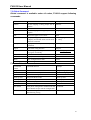
7.18 Network Diagnosis
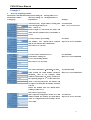
There are some telnet commands for checking your network. Now Listing
below for your information
Command
Function
Example
ping
Check if the destination is accessible
#ping www.google.com
tracert
Show network path info
#tracert www.google.com
show basic
Show network settings
#show basic
show ip route
Show route table
#show ip route
show ip arp
Show arp table
#show ip arp
show ip netstat
Netstat programe
#show ip netstat
telnet
Telnet to another device
#telnet 192.168.1.2
7.19 Restore to factory default
#setdefault (clear gateway settings expect network part)
#setdefault all (clear all settings.)
47