1
The Moving Pixel Company DPhyDecoderCtl User’s Manual. – Rev. 1.2 -- 2/11/13
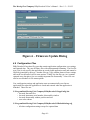
Figure 6 – Firmware Update Dialog
4.6 Configuration Files
DPhyDecoderCtl has three file types that contain application configuration, user settings
and captured data. They are all binary files with undocumented formatting. The first file
type (.bin) is only used by the application to record global application state and cannot be
explicitly generated by the user. Another file type (.cfg) contains almost all user settings
and can be saved/loaded via File menu options. Finally, the last file type (.trc) contains
captured trace data plus a few user settings important for disassembly. A trace file can
also be saved/loaded via File menu options.
User configuration settings and application state are automatically saved in two
application files when the application is closed and restored when the application is
launched. These files are:
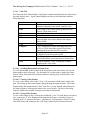
C:\ProgramData\Moving Pixel Company\DPhyDecoderCtl\AppConfig.bin
- last used firmware files
- last used instrument serial number, disassembly window
- last used disassembly window position and size
- user color scheme
C:\ProgramData\Moving Pixel Company\DPhyDecoderCtl\DefaultSettings.cfg
- all other configuration settings except for captured data
- Page 41 -