1
System Operation
Remote Phone Control Feature
The remote phone control feature, which must be enabled in field *91, allows the user to access the security system from any
off-site touch-tone telephone. The control will pick up the incoming call, based on the ring count specified in field *95, and
will announce “SYTEM” every three (3) seconds for the next eight (8) seconds. During this period the panel will wait for a
valid User Code to be entered. If a valid User Code is not entered or the eight (8) second period expires a modem tone will be
generated for remote programming (Compass Downloading). If a valid User Code has been entered, the control will
announce the current system status and/or beeping sounds.
Keypad Functions
Remote Phone Control Feature
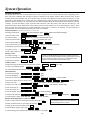
To remotely disarm system:
+ [1]
+ [2]
To remotely arm in AWAY mode:
To remotely arm in STAY mode:
+ [3]
+ [2] or [3] + [0]
To remotely arm in AWAY or STAY with no delay:
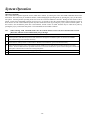
Quick Arm Note:
The installer code
and babysitter code
cannot disarm the
system if armed by
Quick Arm method.
To remotely activate X-10 devices 1-6: [#] + [4] + device no.
+ [#] + [4] + device no.
To remotely activate X-10 devices 7 & 8:
To remotely deactivate X-10 devices 1-6: [#] + [7] + device no.
+ [#] + [7] + device no.
To remotely deactivate X-10 devices 7 & 8:
To remotely Bypass zones:
+ [6] + zone no.
To remotely activate Forced Bypass:
+ [6] + [#]
To remotely check system status: [*]
To end remote phone control session: Hang Up or
8/
+ [9]
Alarm audio verification cannot be used for UL installations.
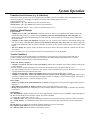
Alarm Audio Verification (Two-Way Voice Feature)
This feature allows the central station operator to listen, talk to or conduct a two-way conversation with an individual(s) at
the premises. It also assists the operator in gathering information about the nature and location of the alarm that may be
helpful in responding to police and fire departments. All LYNXR-Series control panels are capable of supporting the TwoWay Voice feature, however only the LYNXR-EN has this feature built in. The LYNXR/LYNXR24 requires the installation
of the Audio Verification Module (LYNX-AVM). For further information regarding the LYNXR/LYNXR24 Two Way
Voice Feature refer to the LYNX-AVM Installation and Setup Guide. The LYNXR-EN does not make system
announcements when the Two-Way voice feature is active.
Activation
The LYNXR-EN sends the "alarm message" followed by a "Listen-in-to-Follow message" (Contact ID code 606) to the
Central Station. The Listen-in-to-Follow message causes the Central Station's digital receiver to temporarily hold the
phone line for approximately 1-minute. When the LYNXR-EN receives the "kissoff" from the central station, indicating
that the alarm message has been received, the Two-Way Voice (AVM) feature is activated in the (default) “Listen
Mode” and sirens and keypad sounds are discontinued. The LYNXR-EN transmits a beep acknowledgment to the
Central Station, once per second. The beep alternates between two tones and indicates that the LYNXR-EN is waiting for
a session command from the Central Station operator. Once a command is issued the beep acknowledgement is
discontinued, however, if a command is not issued within two minutes the system will “time out” and the call will be
terminated.
–41–