1
LYNXR-IE Installation and Setup Guide
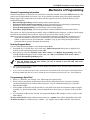
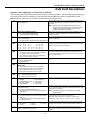
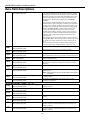
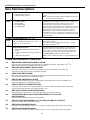
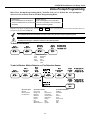
Voice Prompt Programming
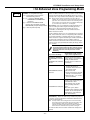
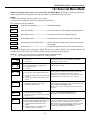
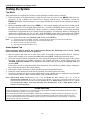
To Delete Sensors
Select
Select
Sensor to
"Delete Sensors"
be Deleted
Press
Press
[SELECT]
[DELETE]
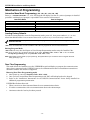
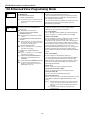
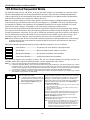
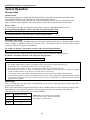
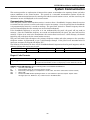
To Add an Emergency Pendant
Select
Activate
Select
pendant type
transmitter
descriptors for the
"Emergency"
See (5)
twice
programmed pendant
Press
Press
Press
[SELECT]
[SELECT]
[ADD]
System announces
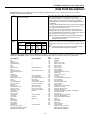
(5) Pendant Type
Medical
Fire
Silent Police
Police
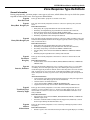
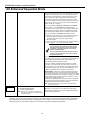
When adding wireless keys, wait 5 seconds between transmissions.
!
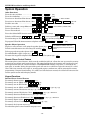
To Add a Wireless Key
Select
Activate
System announces
"Keys"
transmitter twice
the key number
Press
[SELECT]
Press
[ADD]
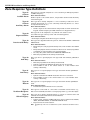
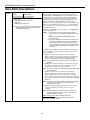
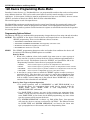
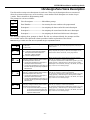
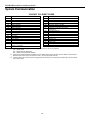
LYNXR-IE automatically saves phone and account number data once all available digits are entered.
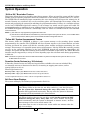
To Add First Central Station Phone Number
Select
Enter first
Enter first
"First Central
central station
central station
Station Phone
phone number
account number
Number"
(up to 20 digits)
(up to 4 digits)
Press
Press
Press
[SELECT]
[ADD]
[ADD]
!
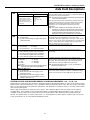
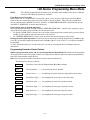
All four digits of the Central Station account number must be entered. If ten-digit format is selected, all
ten digits must be entered.
To Add First Central Station Account Number
Select
Enter first
"First Central
central station
Station Account
account number
Number"
(up to 4 or 10 digits)
Press
Press
[SELECT]
[ADD]
- 44 -