1
Kit Contents
1. Scanmaster unit
2. External logging cable with serial adapter
3. Misc. wiring connectors
Available accessories
1. Serial to USB adapter
2. Optional analog input cable
For Support
On the web, www.turbotweak.com/forum, go to the Scanmaster 3 forum.
You can go there to find out about any recent updates.
Installing the Scanmaster
1. Disconnect the battery negative cable under the hood.
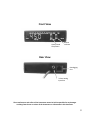
2. Mount the Scanmaster inside the car on the dashboard, or any other
convenient location.
3. Connect the black wire to a good ground. You can use a skinny male spade
terminal to plug into pin A, which is ground.
4. Connect the red wire to a fused ignition power source. One of the empty
IGN terminals in the fuse box works well. You can install a male spade
connector, which will push into an IGN terminal.
5. Connect the white wire to the serial data signal at the ALDL connector under
the dash. The signal is pin M, bottom row, far right. You can use the
included skinny male spade connector to push into the plug.
6. Reconnect the battery and test the Scanmaster.
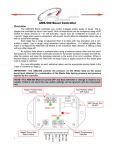
ALDL Connector pin M
2