1
Datalogging
The Scanmaster can be connected to a laptop to record data using the software TunerPro V5,
which can be downloaded from the website www.tunerpro.net in the download section. It is
free but donations are encouraged.
A serial data cable included with the Scanmaster connects the unit to a laptop. The cable
connector is for a serial port, so if your laptop only has USB, you will need an adapter. Note
that the logging cable is not a standard phone modular cable. Contact TurboTweak for
replacement parts.
After installing TunerPro, a definition file will be necessary to properly communicate with the
Scanmaster. This definition file, called an “ADX” file, can be downloaded from the TurboTweak
website, www.turbotweak.com/forum in the download section. You may need to register to
download (free). Download the file and save it into the same folder as TunerPro.
1. Connect the cable from the Scanmaster to laptop.
2. Start TunerPro software.
3. Go to menu item Acquisition, then Load Definition File… Browse to where the ADX file is
and open it.
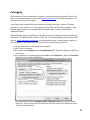
4. Set up acquisition by selecting menu item Tools, then Preferences… Select the Data Acq.
tab and set up the area circled below.
You may have to press the Configure Plug-In Component button to set up the right
COM port. There may be a little trial and error with the COM port to find the one that
works. Hit OK when done.
10