1
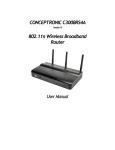
Conceptronic C300APRA2
User Manual
Table of Contents
CONCEPTRONIC C300APRA2 ................................................................................ 1
Version 1.0............................................................................................... 1
802.11n Wireless ADSL Router ............................................................................. 1
User Manual ................................................................................................ 1
About This Manual ........................................................................................... 4
Before You Start ........................................................................................... 4
Installation Overview ..................................................................................... 4
Requirements for Installation ........................................................................... 4
WLAN Ethernet Adapter .................................................................................. 4
Operating System ......................................................................................... 5
Web Browser ............................................................................................... 5
Packing List ................................................................................................... 6
Wireless LAN .................................................................................................. 6
Radio Transmission........................................................................................ 7
Range........................................................................................................ 7
SSID .......................................................................................................... 7
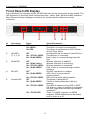
Front Panel LED Display..................................................................................... 8
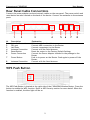
Rear Panel Cable Connections ............................................................................. 9
WPS Push Button ............................................................................................. 9
Installation ...................................................................................................10
Before You Begin .........................................................................................10
Installation Notes.........................................................................................10
Information you will need from your ADSL service provider ...................................12
Information you will need about C300APRA2 .....................................................13
Information you will need about your LAN or computer ........................................14
Device Installation.....................................................................................14
Power on Router .......................................................................................14
Factory Reset Button .................................................................................15
Setup ..........................................................................................................16
Web-based Configuration Utility.......................................................................16
QUICK START ..............................................................................................18
INTERFACE SETUP - INTERNET..........................................................................23
PPPoE/PPPoA...........................................................................................25
Dynamic IP Address....................................................................................27
Static IP Address .......................................................................................28
Bridge Mode ............................................................................................29
INTERFACE SETUP - LAN .................................................................................30
Use the Router for DHCP .............................................................................31
Disable the DHCP Server..............................................................................31
Use DHCP Relay ........................................................................................31
INTERFACE SETUP - WIRELESS ..........................................................................32
Basic Wireless ..........................................................................................33
WPS Security ...........................................................................................34
WEP Encryption ........................................................................................36
WPA Encryption ........................................................................................36
ADVANCED....................................................................................................37
ADVANCED - FIREWALL ..................................................................................37
ADVANCED - Routing .....................................................................................38
ADVANCED – NAT .........................................................................................39
2