1
134
Index
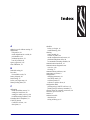
P
PAPER OUT message, 102
parallel port
characteristics of parallel connection, 19
connection and configuration, 21
connector location, 8
setting parallel communications, 75
parity setting, 76
passwords
default, 58
disable, 58
entering, 58
setting password level, 84
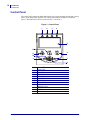
PAUSE button
description, 11
FEED and PAUSE self test, 119
PAUSE self test, 115
Peel-Off mode
loading media, 33
media path, 31
print mode use described, 30
selecting, 64
power
connect to power source, 23
power cord specifications, 24
power switch and connector locations, 8
site selection, 18
Power-On Self Test (POST), 113
print configuration label
CANCEL self test, 114
List Setup command, 71
print darkness setting, 62
print modes
described, 30
load media for different print modes and options,
33
media paths, 31
selecting, 64
print network configuration label, 71
instructions and sample label, 60
print quality
troubleshooting, 105
print server
characteristics of internal wired connection, 19
characteristics of wireless connection, 19
print width setting, 66
79695L-001 Rev. A
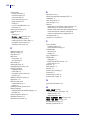
printer components, 9
printer diagnostics, 113
printer language modes, 13
printer options, 130
described, 30
load media for different print modes and options,
33
media paths, 31
printer settings
backfeed, 81
baud, 75
control prefix, 78
data bits, 76
date, 83
delimiter character, 79
format convert, 83
format prefix, 78
host handshake, 76
idle display, 83
label top, 81
language, 85
left position, 81
maximum label length, 67
media type, 65
network configuration label as baseline, 60
network ID, 77
parallel communications, 75
parity, 76
print darkness, 62
print method, 65
print width, 66
protocol, 77
saving, 57
serial communications, 75
setting through control panel, 56
time, 83
ZPL mode, 79
printhead
cleaning, 90
faulty thermistor, 102
head close setting, 80
invalid replacement head error, 101
pressure adjustment, 53
printing specifications, 126
product markings, 125
protocol setting, 77
ZM400/ZM600 User Guide
3/27/07