1
Table Of Contents
Section
1
1.1
1.2
2
3
4
4.1
5
5.1
6
6.1
7
7.1
7.2
7.3
7.4
7.5
8
8.1
8.2
8.2.1
8.2.2
8.2.3
8.2.4
8.3
8.4
8.5
9
10
10.1
10.2
10.3
Name
INTRODUCTION
A Word on Video/Audio Switchers
Factors Affecting Quality of Results
SPECIFICATIONS
HOW DO I GET STARTED?
UNPACKING AND CONTENTS
Optional Accessories
KRAMER VS-3000 REMOTE CONTROLLER
Getting To Know Your VS-3000 Remote Controller
INSTALLATION
Rackmounting
CONNECTING TO OTHER DEVICES
Connecting to a PC
Connecting to a video Matrix or other Controlled Devices
Connecting to the an RS-485 Controlled machine or Controller
Connection to a Dry Contact Controlling Device
Connecting the Keyboard Extension
USING THE VS-3000
Turning On the VS-3000
Using the Front Panel Controls
Key Assignments
LCD Assignments
Setup
Setup – List of Machines
Menu Functions
Flash Memory Update
Error Messages
TAKING CARE OF YOUR MACHINE
TROUBLESHOOTING
Power and Indicators
HUM and Electric Interference
Control Related Problems
Limited Warranty
Page
2
2
2
3
3
3
3
5
5
6
6
6
6
6
7
7
7
7
7
7
7
9
9
10
11
12
13
16
16
16
16
17
17
List of Illustrations
Figure
1
2
Page
VS-3000 Front/Rear Panel Features
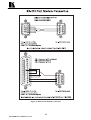
RS-232 Null Modem Connections
5
15
List of Tables
Table
1
VS-3000 Front/Rear Panel Features
6