1
9–20
Maintenance and Troubleshooting
Maintenance
and Troubleshooting
TEST-PGM and
TEST-RUN Modes
Test Mode allows the CPU to start in TEST-PGM mode, enter TEST-RUN mode, run
a fixed number of scans, and return to TEST-PGM mode. You can select from 1 to
65,525 scans. Test Mode also allows you to maintain output status while you switch
between Test-Program and Test-Run Modes. You can select Test Modes from either
the Handheld Programmer (by using the MODE key) or from DirectSOFT32 via a
PLC Modes menu option.
The primary benefit of using the TEST mode is to maintain certain outputs and other
parameters when the CPU transitions back to Test-program mode. For example,
you can use AUX 58 from the DL205 Handheld Programmer to configure the
individual outputs, CRs, etc. to hold their output state. Also, the CPU will maintain
timer and counter current values when it switches to TEST-PGM mode.
NOTE: You can only use DirectSOFT32 to specify the number of scans. This feature
is not supported on the Handheld Programmer. However, you can use the Handheld
to switch between Test Program and Test Run Modes.
With the Handheld, the actual mode entered when you first select Test Mode
depends on the mode of operation at the time you make the request. If the CPU is in
Run Mode mode, then TEST-RUN is available. If the mode is Program, then
TEST-PGM is available. Once you’ve selected TEST Mode, you can easily switch
between TEST-RUN and TEST-PGM. DirectSOFT32 provides more flexibility in
selecting the various modes with different menu options. The following example
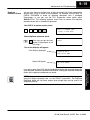
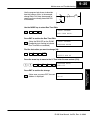
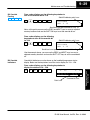
shows how you can use the Handheld to select the Test Modes.
Use the MODE key to select TEST Modes (example assumes Run Mode)
MODE
NEXT
*MODE CHANGE*
GO TO T–RUN MODE
ENT
Maintenance
and Troubleshooting
Press ENT to confirm TEST-RUN Mode
ENT
(Note, the TEST LED on the DL205
Handheld indicates the CPU is in
TEST Mode.)
*MODE CHANGE*
CPU T–RUN
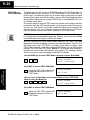
You can return to Run Mode, enter Program Mode, or enter TEST-PGM
Mode by using the Mode Key
CLR
MODE
NEXT
NEXT
ENT
*MODE CHANGE*
GO TO T–PGM MODE
Press ENT to confirm TEST-PGM Mode
ENT
(Note, the TEST LED on the DL205
Handheld indicates the CPU is in
TEST Mode.)
DL205 User Manual, 3rd Ed., Rev. A, 08/03
*MODE CHANGE*
CPU T–PGM