1
9–19
Maintenance and Troubleshooting
Duplicate
Reference Check
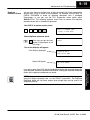
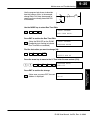
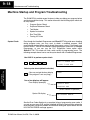
You can also check for multiple uses of the same output coil. Both programming
devices offer a way to check for this condition. For example, you can AUX 21,
CHECK PROGRAM to check for duplicate references from a Handheld
Programmer, or you can use the PLC Diagnostics menu option within
DirectSOFT32. The following example shows how to perform the duplicate
reference check with a Handheld Programmer.
Use AUX 21 to perform syntax check
CLR
C
B
2
1
AUX
ENT
Select duplicate reference check
ENT
(You may not get the busy
display if the program is not
very long.)
BUSY
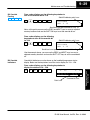
One of two displays will appear
Error Display (example)
Maintenance
and Troubleshooting
AUX 21 CHECK PRO
1:SYN 2:DUP REF
$00024 E471
DUP COIL REF
(shows location in question)
Syntax OK display
NO DUP REFS
?
NOTE: You can use the same coil in more than one location, especially in programs
using the Stage instructions and / or the OROUT instructions. The Duplicate
Reference check will find these outputs even though they may be used in an
acceptable fashion.
Maintenance
and Troubleshooting
If you get an error, press CLR and the Handheld will display the instruction where the
error occurred. Correct the problem and continue running the Duplicate Reference
check until no duplicate references are found.
DL205 User Manual, 3rd Ed., Rev. A, 08/03