1
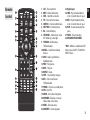
Remote
Control
1.
2.
3.
4.
5.
6.
7.
8.
LIST – Show recorder list.
MUTE – Enable/disable mute.
INFO – Show/Hide service info.
TTX – Enter/exit teletext menu.
SUBTITLE – Enter/exit subtitle menu.
EXIT/*NAVI – Exit current menu.
OK – Select/confirm key.
LEFT/RIGHT – Volume down / arrow
left / Volume up / arrow right.
9. TV/RADIO –Switch between
TV/Radio channels.
10. RECALL – Recall to last watching
channel.
11. GOTO – Jump to specific time in
multimedia mode.
12. PREV – Play previous.
13. NEXT – Play next.
14. REPEAT – Repeat.
15. STOP – Stop recording / stop play.
16. REC – Start to record current
TV/Radio channel.
17. POWER – Enter or leave standby mode.
18. EPG – Enter EPG.
19. AUDIO – Enter audio setting menu.
20. UP/DOWN - Channel up / arrow up /
Channel down / arrow down
21. MENU – Enter main menu.
22. FAVOURITE – Favorite programs.
23. Digital input.
24. FWD – Play fast forward with x2,
x4, x8, x16 and x32 times of speed.
25. REV – Play fast backward with x2,
x4, x8, x16 and x32 times of speed.
26. PLAY – Resume current play from
pause.
27. PAUSE – Pause current play.
28. RED/GREEN/YELLOW/BLUE
EN
*NAVI – NAVI bar is available when EXIT
button is pressed in EPG, TTX, AUDIO or
SUBTITLE menu.
3