1
Contents
GETTING STARTED...................................................................................... 10
Signature Manager Overview ..................................................................... 11
How Does it Work? ................................................................................ 11
But That's Not All... ............................................................................... 12
And There's More... ............................................................................... 12
Further Help and Support .......................................................................... 13
Closing Signature Manager ........................................................................ 13
INSTALLATION & DEPLOYMENT ..................................................................... 14
Installation Overview ................................................................................ 15
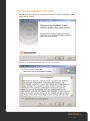
The Installation Process ............................................................................ 16
Configuring Outlook Web Access ................................................................ 17
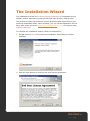
The Installation Wizard ............................................................................. 18
The Setup Wizard .................................................................................... 21
Setting up ExSync .................................................................................... 26
How do I Obtain a Copy of ExSync.exe? ................................................... 26
Setting the Update Mode for ExSync ........................................................ 27
Ensuring that ExSync.exe Runs Automatically ........................................... 28
Deploying via a Logon Script ..................................................................... 29
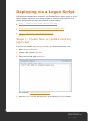
Stage 1: Create New or Update existing logon.bat ..................................... 29
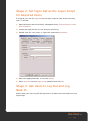
Stage 2: Set logon.bat as the Logon Script for Required Users .................... 30
Stage 3: Ask Users to Log Out and Log Back In ........................................ 30
Deploying via Group Policy Object (GPO) ..................................................... 31
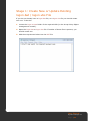
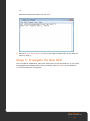
Stage 1: Create New or Update Existing logon.bat / logon.vbs File ............... 32
Stage 2: Propagate the New GPO ............................................................ 33
Configuring Outlook Web Access Updates from the Server ............................. 34
Increasing the Default Outlook Web Access Signature Length ......................... 36
Microsoft Outlook Web Access 2007 or 2010 ............................................. 36
Microsoft Outlook Web Access 2003 ......................................................... 36
Updating the Signature Length in Exclaimer Signature Manager ...................... 38
Deploying multiple users' Signatures to One Designated User ......................... 39
User Manual
Signature Manager 2.0
Page |3