1
Fader Section
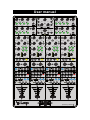
The Channel Faders adjust the channel volume. The Crossfader enables transitions between decks
by dragging it from one side to the other. For the line faders and cross fader, there are three different
curves (Linear, Rapid, Switch) available which can be set in the system mode.
Extensions
All the controls in Traktor Pro may be assigned to new functions, which are accessed in the
Preferences/Controller-Manager.
Particulars are given in the Traktor Pro manual.
Since many shift functions of the controller remain unassigned, the following extensions are
suggested:
•
•
•
•
•
EQ- potentiometers
FX- potentiometers
Potentiometers in the Master-section
Green buttons in FX- and EQ- sections
Grey buttons in EQ- sections
As long as Leds are allocated to buttons, they may be controlled by the same Midi- commands as
those for the buttons.
For information about the numbers of the particular Midi- commands, first check the included list of the
corresponding functions.