1
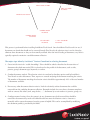
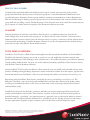
All Documents in DMS
100% of available
documents
Initial Selection Criteria
Candidate Usable
Documents
Candidate Usable
Documents
Selected Usable
Documents
5 – 10% of Available
Documents
This process is performed before installing LexisNexis Total Search. Once LexisNexis Total Search is in use, if
documents are found that should not be accessed through Total Search, the selection criteria can be altered to
eliminate these documents or they can be manually removed. After the initial loading of documents, very little is
typically required to maintain a useful document collection.
The major steps taken by LexisNexis® Content Consultant in selecting documents
1. Create initial criteria for “usable knowledge”. Users should be asked to describe the characteristics of
documents they find most useful. This is often based on the profile of the document, such as titles,
practice groups, document type, keywords, or author.
2. Conduct document analysis. The selection criteria is translated to database queries used by LexisNexis
Total Search to select documents. Then, reports are created analyzing the documents matching the criteria.
The number of documents matching the selection criteria should be approximately 10% of the total number
of documents available.
3. If necessary, refine document selection criteria. Look for obviously useless documents that could be
removed from the candidate document collection. Examples include fax cover sheets, document templates
with no content, files titled “junk, temp, delete, ....”, documents by certain authors or practice groups, etc.
4. Configure manual vetting. Once the system is in use, documents may be discovered that should be
removed or documents may need to be added that did not meet the selection criteria. A means to
manually add or remove documents from the system is helpful. This can be accomplished by modifying
the document profile(s) provided by the DMS.