1
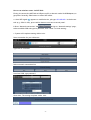
How to operate with WiFi Disk under IOS
Firstly, pls connect the WiFi Disk to USB port on PC (or electric outlet Via USB Adapter) to
get power. Secondly, Slide button to select WiFi mode. Thirdly, install TIOD software on
your mobile devices (You can upload it free from App store).
There are details:
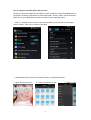
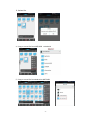
a. Choose Build-in WiFi network. Pls open the WiFi-setting on your mobile devices,
choose the default name “SDISK” network. WiFi Disk will start to emit WiFi signal in 15
seconds. Pls make sure the WiFi signal
next step
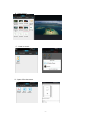
b.Open TIOD, Select
button
appears on the devices and then go on with
, and type default IP 192.168.169.1, Press “go”
.
c. Type default ID:Admin and Password:Admin to login
d. Enjoy the content on WiFi Disk freely
-3-