1
Product Introduction
With build-in WiFi network, the WiFi Disk allows you to stream digital media content
wirelessly (like Movie, music, word, photos) to your IOS/Android/Windows devices, you
can add up to 256GB of space accessed wirelessly from your mobile device easily, so no
longer limited to the space available on your portable device.
Packing list
Components
Quantity
WiFi Disk
1
User Manual
1
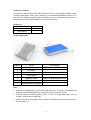
Product Appearance
Symbol
Name
Description
1
Slide appliance
Slide up to get USB plug
2
Air vents
3
Reset button
4
WiFi mode
5
Memory mode
6
WiFi indicator
7
Flash memory indicator
Button to USB plug direction
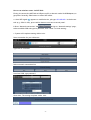
Step:
1. Slide out of the USB plug, connect to any USB port on PC (or electric outlet via a USB
Adapter), the WiFi Disk gets power with flash memory indicator shines.
2. Slide the button to select memory mode, it works as normal flash Disk, you can
storage / delete files on WiFi Disk.
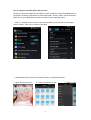
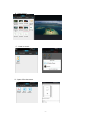
3. Slide the button to select WiFi mode, connect the mobile devices and you can enjoy
the contents in it.
-2-