1
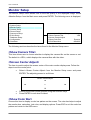
User’s Manual Bits .......................................................................................................16 Stop ......................................................................................................16 Parity ....................................................................................................16 <Key Beep>................................................................................................................17 Monitor Setup...................................................................................................................18 <Show Camera Title> .................................................................................................18 <Screen Center Adjust>..............................................................................................18 <Show Color Bar> ......................................................................................................18 <VGA Resolution> ......................................................................................................19 Camera Setup >................................................................................................................20 <Camera Select>........................................................................................................20 <Dome Protocol>........................................................................................................20 <Dome ID> .................................................................................................................20 <Camera Title> ...........................................................................................................20 <Covert>.....................................................................................................................21 <Brightness> ..............................................................................................................21 <Contrast>..................................................................................................................22 <Saturation> ...............................................................................................................22 <Hue>.........................................................................................................................22 Record Setup ...................................................................................................................23 <Record Mode>..........................................................................................................23 <Schedule Setup> ......................................................................................................24 Day/ Night Time Start ...........................................................................24 Day / Night Time End ...........................................................................24 Weekend Schedule ..............................................................................24 Weekend Start/ End .............................................................................24 <Preset Record Configuration> ..................................................................................25 <ezRecord Setup>......................................................................................................26 <Circular Recording>..................................................................................................27 <Purge Data> .............................................................................................................27 Purge All Data ......................................................................................27 Purge All Event Data ............................................................................27 Purge Event Before ..............................................................................28 Start to Purge .......................................................................................28 Sequence Setup...............................................................................................................29 <Main Monitor Dwell> .................................................................................................29 <Main Monitor Schedule>...........................................................................................29 Event Setup ......................................................................................................................31 <Internal Buzzer> .......................................................................................................31 <Event Icon> ..............................................................................................................31 3