1
User’s Manual
3.5.2
Schedule Setup
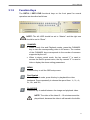
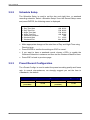
The Schedule Setup is used to set the day and night time, or weekend
recording schedule. Select <Schedule Setup> from the Record Setup menu
and press ENTER; the following menu is displayed.
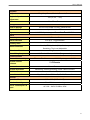
Schedule Setup
AM
PM
PM
AM
06:00
06:00
06:00
06:00
YES
Fri 18:00
Mon 06:00
1. Day Time Start
2. Day Time End
3. Night Time Start
4. Night Time End
5. Weekend Schedule
6. Weekend Start
7. Weekend End
• Make appropriate changes of the start time of Day and Night Time using
Direction keys.
• Press ENTER to confirm the settings or ESC to cancel.
• If you want to have a weekend record, choose <YES> to enable the
Weekend Schedule in advance and then set the Weekend Start/End time.
• Press ESC to back to previous page.
3.5.3
Preset Record Configuration
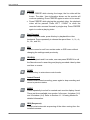
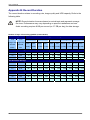
The <Preset Config> is used to select the preset recording quality and frame
rate. In normal circumstances, we strongly suggest you set the item to
<Standard>, the default.
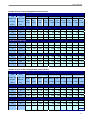
Halfl-D1 mode (NTSC: 720x240@60PPS; PAL: 720x288@50PPS)
Normal PPS
3.75 NTSC
(3.125 PAL)
20
Normal Size
Event PPS
Event Size
11 KB
15 NTSC
(12.5 PAL)
17 KB