1
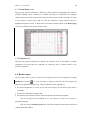
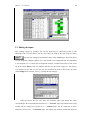
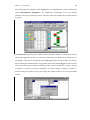
IRIS 2.0 User Manual 21 4.3. Output After having specified all of the inputs, the user may get some results. The Results menu offers the following options: • The Volume Computation option estimates the volume of the polyhedron of combinations of parameter values that respect all the constraints (including bounds and assignment examples) using Monte-Carlo simulation. A window appears where user may change the number of significant digits (Precision) and press the button Start simulation. Then, IRIS determines the dimension of the polyhedron and estimates its total volume (Absolute volume), as well as the ratio between the total volume and the volume of the polyhedron defined by the bounds on the parameters (i.e. excluding the other explicit constraints and the assignment example constraints) (Volume to bounds). The window must be closed to continue using IRIS (button Exit). • The Robust Assignments option computes the inferred parameter values and assignments, as well as the range of possible assignments for each action, if the constraints are consistent. After choosing this option, the outputs area of the screen will reflect the inputs. • The by Input Order option instructs IRIS to sort the actions by their input number. • The by Variability Order option instructs IRIS to sort the actions by decreasing variability order, where variability refers to the difference between the best and worst possible assignments. The outputs area of the screen, updated after choosing the option Robust Assignments, may be enlarged or reduced and contains the following pages: 4.3.1. RESULTS PAGE This page displays a grid with the inferred parameter values and assignments, as well as the range of possible assignments for each action. Depending on the selection previously made in that menu (by Input Order or by Variability Order), the actions appear in the same order as the Actions page (e.g. first figure below) or appear by decreasing order of variability (e.g. second figure below), where variability here means the difference between the best and worst categories in the actions assignment range. The user may change the actions' order at any time, even after the results are computed.