1
10
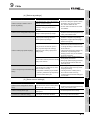
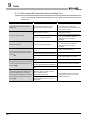
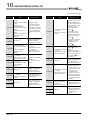
CONCISE ERROR CODE LIST
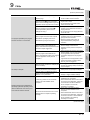
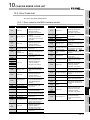
(From the previous page)
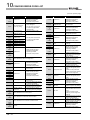
Error
code
Error description and cause
115
The mask bit length setting of
the connection-permitted IP
address is out of range.
116
The access log setting is not
correct.
117
The setting of the access log file
name is not correct.
118
The access log file name is too
long.
119
The maximum file size setting
for the access log is not correct.
120
The maximum file size setting
for the access log is out of
range.
121
The maximum number of
access log files is not set
correctly.
122
The maximum number of
access log files is out of range.
123
The SQL failure log setting is
not correct.
124
The setting of the SQL failure
log file name is not correct.
125
The SQL failure log file name is
too long.
126
The maximum file size setting
for the SQL failure log is not
correct.
127
The maximum file size setting
for the SQL failure log is out of
range.
128
The maximum number of SQL
failure log files is not set
correctly.
129
The maximum number of SQL
failure log files is out of range.
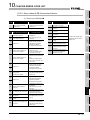
401
The computer ran out of
memory when initializing the
access log file.
402
The computer ran out of
resources when initializing the
access log file.
403
The full path name of the
access log file is too long.
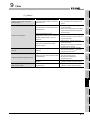
Corrective action
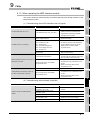
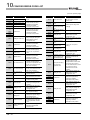
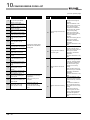
Error
code
404
Error description and cause
Corrective action
The access log file could not be
opened.
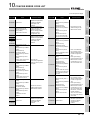
• If no directory exists for
storing the access log file,
create it.
• When the attribution of the
access log file is set to readonly, cancel the setting.
• If read/write is disabled for
the access log file, enable it
in the security setting.
• When the access log file
name represents a directory,
rename or delete the
directory.
• When the access log file has
been open in another
application, terminate the
application.
• Check the disk device for any
fault.
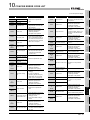
The log could not be written to
the access log file.
• When the disk space is full,
ensure a free disk space.
• When the access log file has
been open in another
application, terminate the
application.
• Check the disk device for any
fault.
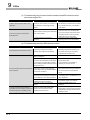
Failed to delete an old access
log file.
• When the attribution of the
oldest access log file is set to
read-only, cancel the setting.
• If read/write is disabled for
the oldest access log file,
enable it in the security
setting.
• When the oldest access log
file has been open in another
application, terminate the
application.
• Check the disk device for any
fault.
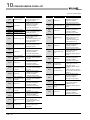
Failed to rename the access log
file.
• When the attribution of the
new and old access log files
is set to read-only, cancel the
setting.
• If read/write is disabled for
the new and old access log
files, enable it in the security
setting.
• When the new and old
access log files have been
open in another application,
terminate the application.
• Check the disk device for any
fault.
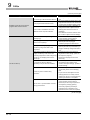
• Configure the settings again
with DB Connection Service
Setting Tool.
405
406
• Terminate any unnecessary
applications.
• Add more memory to the
computer.
• Shorten the path to the
access log file with DB
Connection Service Setting
Tool.
407
(To the next page)
10 - 16