1
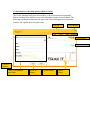
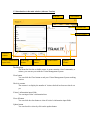
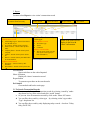
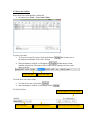
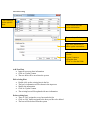
1.3 Introduction to the main window (Advance Version)
Menu bar
Close Button
Current Time
Event Tracker
Check in
counter
Visitor’s information
input fields
Print badge
Button
Clear all
button
Update button
Upload
Picture
The Menu bar
The Menu bar lists the available menus. A menu contains a list of commands, or
actions, you can carry out with the Visitor Management System.
Close button
You can click the Close button to end your Visitor Management System working
session.
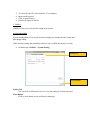
Check in counter
The counter is to display the number of visitors checked in whose not check out
yet.
Visitor’s information input fields
You can input visitor’s information here
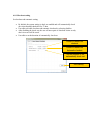
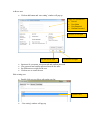
Clear all button
You can click the clear button to clear all visitor’s information input fields
Update button
You can check in visitor by click on the update button