1
Network Camera Server
User’s Manual
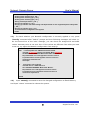
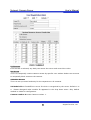
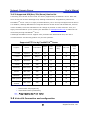
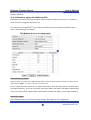
2.4.2 Supported PTZ(Pan/Tilt/Zoom) Device list
• Following is list of PTZ devices which are directly supported by FlexWATCHTM server. Note that
some of PTZ has not been field approved, although manufacturer integrated its protocol into
FlexWATCHTM server. Thus, it is highly recommended for you to use only field approved PTZ device.
• In addition, although Manufacturer integrated Protocol of PTZ device and did field test, PTZ can
not be workable, since PTZ manufacturer can change its protocol or other functions. Thus, it is
highly recommended for you to contact your distributor or sales@flexwatch.com to make sure its
connectivity through FlexWATCHTM server.
• Although FlexWATCHTM server support more protocols than below listed ones, the user is
recommended to use following product only for PTZ operation.
Supported PTZ List by FlexWATCHTM Server
Lab Test
Field
Test
O
O
O
485(D)
O
O
O
SRX-500
485
O
O
O
* VICON
V-1311
485
O
O
O
Samsung
MRX-1000
485
O
O
O
InterM
VRX-2201
485
O
O
O
ERNITEC
BDR-510
485
O
O
FINE system
CRR-1600I
232
O
O
O
Samsung
Techwin
SRX-100B
485
O
O
O
Model
Command
Prese
t
Spectra
485 (P)
** Pelco
Spectra
Seyeon
Supplier
** Pelco
O
Auto
PAN
Program
Only
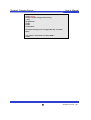
NOTE : Symbol Reference
* : Preset function was program only.
** : Preset function was Lap Tested only.
*** : Preset function was field Tested
2.5 Voice Kit Connection and configuration
69
Seyeon Tech Co., Ltd