1
Release 12/01
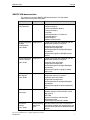
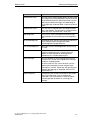
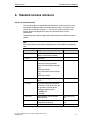
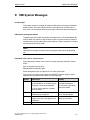
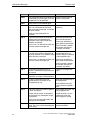
HMI System Messages
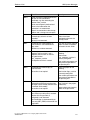
Number
Effect/Cause
Remedy
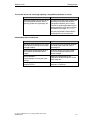
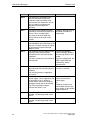
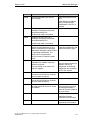
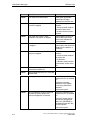
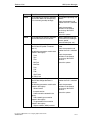
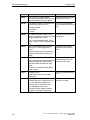
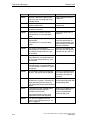
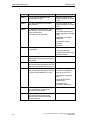
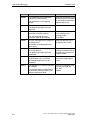
290002
It is not possible to convert a value from Check the value range or
a source format to a target format.
type of the variable.
The message can be entered in the
message buffer for up to four more
failed tags, if necessary. After that, the
message number 290005 is issued.
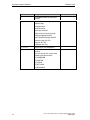
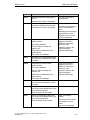
290003
This message is issued when message
number 290000 is triggered more than
five times.
Check in the configuration
that the tag addresses have
been set up in the PLC.
In this case, no further individual
messages are generated.
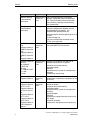
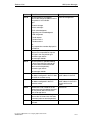
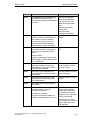
290004
This message is issued when message
number 290001 is triggered more than
five times.
Observe the value range for
the tag type.
In this case, no further individual
messages are generated.
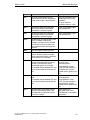
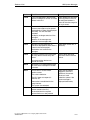
290005
This message is issued when message
number 290002 is triggered more than
five times.
Check the value range or
type of the variable.
In this case, no further individual
messages are generated.
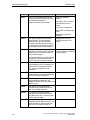
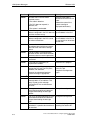
290006
The threshold values configured for the
tag have been violated by values
entered.
Observe the configured or
current threshold value of the
tag.
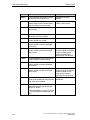
290007
Insert the specified data
There is a difference between the
record tag in the source
source and target structure of the
structure.
recipe currently being processed. The
target structure contains an additional
data record tag which is not available in
the source structure.
The data record tag specified is
assigned its start value.
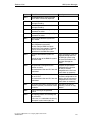
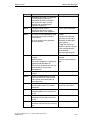
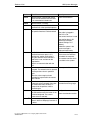
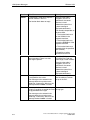
290008
There is a difference between the
Remove the specified data
source and target structure of the
record tag in the specified
recipe currently being processed. The
recipe from the project.
source structure contains an additional
data record tag which is not available in
the target structure and therefore
cannot be assigned.
The value is rejected.
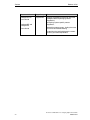
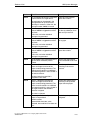
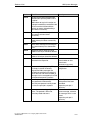
290010
The storage location configured for the
recipe is not permitted.
Check the path specification
configured.
Possible causes:
Impermissible characters, write
protected, data medium full or does not
exist.
ProTool User Manual How to configure graphics-based units
A5E00149244
D-23