1
1. Introduction The Russian Flu website is the product of the integration of Apache Solr and Blacklight, a Ruby on Rails User Interface. This site allows a allow a user to search indexed historical articles documenting the Russian Flu pandemic and view the corresponding search results and multimedia. This manual addresses the set up associated with russianflu.lib.vt.edu as well as the necessary steps to maintain it. 2. Getting Started 2.1 Requirements In order to use and edit russianflu.lib.vt.edu one must have a stable Internet connection and access to the computer’s terminal. The first thing needed is an installation of Ruby and Rails for Blacklight, and Java for Solr. The current Solr release requires Java 1.7 or greater, and the current Blacklight release requires Ruby 1.9 or greater, Rails 3.2 and 4.x (although, Rails 4 is recommended), and Java 1.6 or greater. 2.2 Logging In A user must have an account on the russianflu.lib.vt.edu server in order to access any files associated with the Russian Flu website. Once access is granted, a user can ‘ssh’ to the Russian flu server by running the command ‘ssh YOURPID@russianflu.lib.vt.edu’
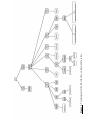
in a terminal. The Russian Flu server can also be accessed through rlogin. Once on the server, a user will find themselves within their home folder at the full path: /home/YOURPID. The Blacklight and Solr files are located at the full path: /blacklight/blacklight. See Figure 1 for the file configuration within the /blacklight directory. 2.3 Initial Commands All work done within the Blacklight application should be done as the blacklight user. To become the blacklight user, issue the following command: user:~$ ‘sudo -u blacklight –s’ 9