1
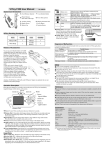
image into ViTiny memory. You can also save by pressing down on the Zoom wheel. In Preview Mode, press this button to compare images. In Setting Mode, press this button to confirm. Light Control: Press this button to change white LED brightness. Four levels are available. Return/Preview: In normal mode, press this button to enter Preview Mode. In other modes, press this button to return to normal mode. system is not used, to maintain battery life. For long storage, remove batteries to prevent damage from battery leakage. ViTiny can also use alkaline batteries. Do not mix battery types. Do not recharge alkaline batteries. Accessories Anti-slide Pads: Two anti-slide pads are included. If desired, remove back-tape from anti-slide pads and stick to ViTiny where you want, like in this picture. Power-adapter: Plugs into a wall socket and into the USB cable. It will accept from 100V to 240V AC and output 5V DC. Mini-USB cable: USB to mini-USB cable. Carries data between ViTiny and PC. Also carries power from PC or power-adapter to ViTiny for operation and recharging batteries. Power Supply ViTiny includes three Ni-MH rechargeable batteries. ViTiny can run from batteries or from the USB cable. The Ni-MH batteries will recharge automatically, without removing the batteries, if you use the USB cable to connect ViTiny to your computer or the USB power adapter. When recharging in power-off status the white LEDs will flash twice in every three seconds. If recharging in power-on status, the icon will show on the screen. When charging complete in power-off status, the white LEDs will flash once in every three seconds. If charging complete in power-on status, the icon will show on the screen. Recharge Ni-MH batteries every several months, even if Settings Power Saving: Sets the time ViTiny waits before automatically turning off the power. Status Display: Turn screen status display icons on/off. 2