1
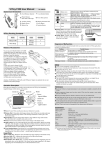
Controls ViTiny FUN50,512,524 User Manual Ver.070705 ViTiny Packing Contents Zoom Wheel and Picture-button Name Quantity Name Special Effects Button Power Button Quantity Aiming Mark ViTiny 1 Anti-slide Pads 2 Power Adaptor 1 Installation CD Disk 1 Mini-USB Cable 1 Cleaning Cloth 1 Manual 1 AAA Ni-MH Rechargeable Battery 3 Wrist Strap 1 Distance Dial Setting Button Save/Compare /Confirm Button Display Screen Light Control Button Return/Preview Button Zoom Wheel and Picture-button: This wheel zooms in/out. Also, pressing down on the wheel saves the image to ViTiny memory. Distance Dial: Clear plastic dial changes distance from ViTiny lens to surface and stops the lens from touching target surface. This focusing mechanism is used to get a clear observation image. Aiming Mark: Circular mark on back of case to show position of lens. Helps locate lens over target. Special Effects: Press this button to select different image effects. Power: Hold this button 2 seconds to turn on/off ViTiny. Settings: Press this button to enter the Setting Mode. Save/Compare/Confirm: Press this button to save the current Operation Pressing the power button for 2 seconds will put ViTiny into the normal Observation Mode. The magnified images will be shown on the screen. Put the Aiming Mark on the back of the ViTiny case approximately over the target object. Use the display screen to center the image. You may touch the clear plastic lens protector to the area around the target. Press the save button or zoom wheel to capture image to memory. 1